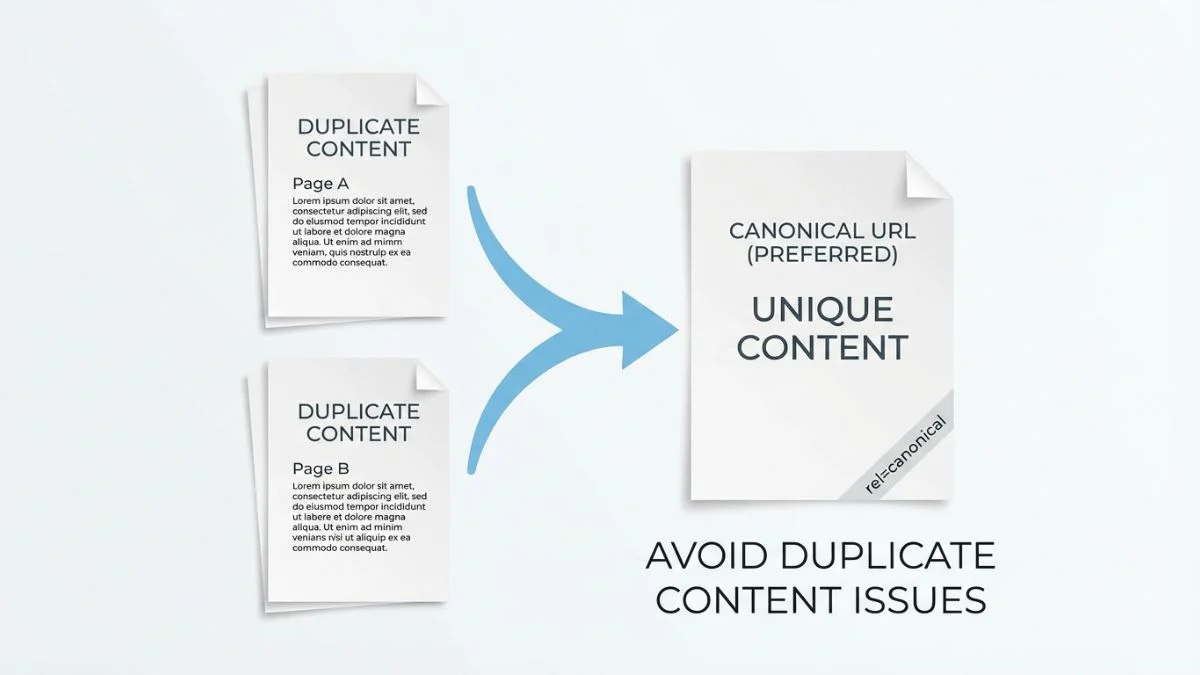
How to Avoid Duplicate Content Issues

How to Avoid Duplicate Content Issues: Complete SEO Guide 2026
⚡ Quick Overview
- Impact: Can dilute rankings and waste crawl budget
- Common Causes: URL variations, scraped content, printer versions
- Primary Solution: Canonical tags and 301 redirects
- Google's Stance: No "penalty" but significant ranking impact
- Detection Time: 15-30 minutes with right tools
Duplicate content is one of the most misunderstood and frequently encountered issues in SEO. While Google doesn't impose a direct "duplicate content penalty," duplicate content can significantly harm your search visibility by diluting ranking signals, wasting crawl budget, and confusing search engines about which version to rank.
According to Google's official documentation, duplicate content occurs when "substantive blocks of content within or across domains either completely match other content or are appreciably similar." This comprehensive guide will help you identify, prevent, and resolve duplicate content issues to protect your SEO performance in 2026.
What is Duplicate Content?
Duplicate content refers to substantial blocks of content that appear in more than one location—either on your own website (internal duplication) or across different websites (external duplication).
The Truth About Google's "Duplicate Content Penalty"
💡 Important Clarification
Google's John Mueller has repeatedly stated there is no "duplicate content penalty" where Google actively punishes sites for duplication. However, duplicate content DOES cause significant issues:
- Ranking dilution: Google must choose which version to rank, potentially not your preferred one
- Link equity dilution: Backlinks get split across multiple versions instead of consolidating to one
- Crawl budget waste: Search engines waste resources crawling duplicate versions
- User confusion: Multiple versions create poor user experience
Types of Duplicate Content
| Type | Description | Severity |
|---|---|---|
| Internal Duplication | Same content appears on multiple pages within your site | Medium-High |
| Cross-Domain Duplication | Your content appears on other websites (scraped/syndicated) | High |
| Near-Duplicate | Content is very similar with minor variations | Medium |
| Technical Duplication | Same content accessible via multiple URLs | Medium |
| Boilerplate Content | Repeated headers, footers, sidebars across pages | Low |
Common Causes of Duplicate Content
Understanding the root causes helps you prevent duplication before it happens:
1. URL Variations
The most common technical cause—identical content accessible via different URLs:
🔗 Common URL Variation Issues:
HTTP vs. HTTPS Variants
http://example.com/page/
https://example.com/page/  (duplicate!)
WWW vs. Non-WWW
https://www.example.com/page/
https://example.com/page/  (duplicate!)
Trailing Slash Variations
https://example.com/page
https://example.com/page/  (potentially duplicate)
Index File Variations
https://example.com/folder/
https://example.com/folder/index.html  (duplicate!)
Case Sensitivity
https://example.com/Page/
https://example.com/page/  (may be duplicate on some servers)
URL Parameters
https://example.com/products/
https://example.com/products/?sort=price  (often duplicate)
Solution: Implement canonical tags, 301 redirects, and consistent internal linking. See our canonical tags guide.
2. Printer-Friendly and Mobile Versions
Creating separate printer or mobile-friendly versions creates duplicates:
https://example.com/article/
https://example.com/article/?print=yes
https://m.example.com/article/
Solution: Use responsive design (eliminates need for separate mobile URLs) and implement canonical tags on printer versions.
3. Pagination Issues
Paginated content can create duplication if not handled properly:
- First page duplicated at /page and /page/1
- "View All" pages duplicating paginated content
- Canonicalizing all pages to page 1 (incorrect)
Solution: Proper pagination implementation with self-referencing canonicals or rel="next"/rel="prev" (deprecated but still useful).
4. Product Variations in E-commerce
E-commerce sites frequently create duplicate content with product variations:
❌ Common E-commerce Duplication Issues:
- Separate pages for each color/size (e.g., red-shirt, blue-shirt, green-shirt)
- Product appears in multiple categories with same description
- Manufacturer descriptions used across multiple retailers
- Similar products with minor variations
- Out-of-stock pages with same boilerplate content
Solution: Use canonical tags, create unique descriptions, consolidate variations on single pages with dropdown selectors.
5. Scraped or Syndicated Content
Content appearing on multiple websites:
- Legitimate syndication: Press releases, guest posts republished with permission
- Content theft: Scrapers copying your content without permission
- Licensed content: Stock content used by multiple sites
- Affiliate descriptions: Multiple affiliates using identical product descriptions
Solution: Use canonical links, original content additions, noindex on syndicated versions, DMCA takedowns for theft.
6. Session IDs and Tracking Parameters
Dynamic URLs creating infinite variations:
https://example.com/product?sessionid=abc123
https://example.com/product?sessionid=xyz789
https://example.com/product?utm_source=facebook&utm_campaign=spring
Solution: Remove session IDs from URLs (use cookies instead), handle tracking parameters via Google Search Console URL Parameters tool, use canonical tags.
How to Detect Duplicate Content
You can't fix what you don't know exists. Use these methods to identify duplication:
Method 1: Google Search Console
Your first stop for duplicate content detection:
📊 GSC Navigation:
Google Search Console → Index → Pages

Look for:
- Duplicate URLs without user-selected canonical
- Multiple pages with same title/description
- Alternate page with proper canonical tag
- Google-chosen canonical different from user-declared
The "Coverage" report shows pages Google found but didn't index, often due to duplication.
Method 2: Site Crawlers
Desktop crawlers provide comprehensive duplicate detection:
🕷️ Recommended Crawling Tools:
- Crawl site → View duplicates by title, description, content
- Shows exact duplicate pages
- Identifies near-duplicates (similar content)
- Free up to 500 URLs, £149/year for unlimited
2. Sitebulb
- Visual duplicate content reports
- Similarity detection for near-duplicates
- Prioritized issues by impact
- From $13/month
- Enterprise-level duplicate detection
- Historical comparison
- Automated monitoring and alerts
- From $249/month
Method 3: Copyscape and Plagiarism Checkers
Detect cross-domain duplication (content theft):
- Copyscape - Premium ($0.05/search) and batch options
- Grammarly Plagiarism Checker - Part of premium subscription
- Quetext - Free scans with limited results
-
Google Search - Manual check with quoted text:
"exact phrase from your content"
Method 4: Manual Google Search
Quick spot-check method:
🔍 Google Search Operators:
# Find pages with exact content match
"your unique sentence or paragraph"

# Exclude your own domain
"unique content" -site:yourdomain.com

# Check for similar pages on your site
site:yourdomain.com intitle:"your page title"
Method 5: Siteliner
Siteliner is a free tool specifically for finding internal duplicate content:
- Scans up to 250 pages free
- Shows duplicate content percentage
- Identifies common content across pages
- Highlights specific duplicate blocks
Solutions: How to Fix Duplicate Content
Once identified, use these proven methods to resolve duplication:
Solution 1: 301 Redirects (Permanent Redirects)
Best for: Truly duplicate URLs where one version should no longer exist.
✅ When to Use 301 Redirects:
- Redirecting HTTP to HTTPS
- Redirecting www to non-www (or vice versa)
- Consolidating multiple old URLs to single new URL
- Removing parameters and redirecting to clean URLs
- Fixing trailing slash inconsistencies
Apache .htaccess Examples:
# Redirect HTTP to HTTPS
RewriteEngine On
RewriteCond %{HTTPS} off
RewriteRule ^(.*)$ https://%{HTTP_HOST}%{REQUEST_URI} [L,R=301]

# Redirect www to non-www
RewriteCond %{HTTP_HOST} ^www\.(.*)$ [NC]
RewriteRule ^(.*)$ https://%1/$1 [R=301,L]

# Force trailing slash
RewriteCond %{REQUEST_FILENAME} !-f
RewriteCond %{REQUEST_URI} !(.*)/$
RewriteRule ^(.*)$ https://example.com/$1/ [L,R=301]

# Remove index.html
RewriteCond %{THE_REQUEST} /index\.html
RewriteRule ^(.*)index\.html$ /$1 [R=301,L]
Learn more about redirect optimization.
Solution 2: Canonical Tags (Preferred Method)
Best for: Duplicate content that needs to exist for users but shouldn't compete in search.
🔗 Canonical Tag Implementation:
Basic Syntax:
<link rel="canonical" href="https://example.com/preferred-url/" />Self-Referencing Canonical (Best Practice):
Every page should have a canonical tag pointing to itself to prevent ambiguity:
<!-- On: https://example.com/products/blue-widget/ -->
<link rel="canonical" href="https://example.com/products/blue-widget/" />
Cross-Domain Canonical:
For syndicated content, point to original source:
<!-- On: https://syndicator.com/article/ -->
<link rel="canonical" href="https://originalsource.com/article/" />
⚠️ Canonical Tag Rules:
- Always use absolute URLs (include https://domain.com)
- Place in
<head>section of HTML - One canonical tag per page only
- Canonical URL should return 200 status (not 404 or redirect)
- Don't canonical to paginated pages
- Google treats canonical as a "hint," not a directive
Solution 3: 301 vs. Canonical - When to Use Each
| Scenario | Use 301 Redirect | Use Canonical Tag |
|---|---|---|
| Protocol Duplication | ✅ Yes (HTTP → HTTPS) | ❌ No |
| Printer-Friendly Version | ❌ No (users need it) | ✅ Yes |
| Product Variations | ❌ No (user navigates) | ✅ Yes |
| Old URLs After Migration | ✅ Yes | ❌ No |
| URL Parameters (sorting/filters) | 🤔 Maybe | ✅ Preferred |
| Syndicated Content | ❌ No | ✅ Yes (cross-domain) |
General rule: If users shouldn't see the duplicate URL, use 301. If users need access but search shouldn't index it, use canonical.
Solution 4: Noindex Meta Tag
Best for: Pages you want crawled but don't want indexed (passes link equity unlike robots.txt blocking).
Implementation:
<meta name="robots" content="noindex, follow" />Or via HTTP header:
X-Robots-Tag: noindex, follow💡 Noindex Use Cases:
- Internal search result pages
- Filtered category pages with minimal products
- Tag/archive pages with thin content
- Admin and login pages (combine with robots.txt)
- Thank you and confirmation pages
Solution 5: Robots.txt Blocking
Best for: Preventing crawling entirely (saves crawl budget but doesn't pass link equity).
⚠️ Important Warning
Never combine robots.txt blocking with noindex! If you block a page in robots.txt, Google can't crawl it to see the noindex tag, so the page may remain indexed. Choose one or the other.
Robots.txt Examples:
User-agent: *

# Block URL parameters
Disallow: /*?print=
Disallow: /*?sort=
Disallow: /*sessionid=

# Block search pages
Disallow: /search
Disallow: /*?s=

# Block faceted navigation beyond certain depth
Disallow: /*?filter=*&filter=*&filter=

# Block admin areas
Disallow: /admin/
Disallow: /wp-admin/
Learn more about robots.txt optimization.
Solution 6: Content Modification and Consolidation
Sometimes the best solution is to eliminate duplication at the source:
📝 Content-Based Solutions:
1. Rewrite Duplicate Content
- Make each page substantially unique (30%+ difference)
- Add unique product descriptions for e-commerce
- Expand thin content with additional value
- Use different examples, data, perspectives
2. Consolidate Similar Pages
- Merge multiple thin posts into comprehensive guide
- Combine product variations into single page with options
- Create one definitive resource instead of multiple similar ones
- 301 redirect old URLs to new consolidated version
3. Delete Truly Unnecessary Pages
- Remove low-value duplicate content
- 404 or 410 pages no longer needed
- Remove from sitemap
- Consider redirecting if pages had valuable backlinks
4. Use Dynamic Content Insertion
- Automatically insert unique elements (location, date, user data)
- Personalize boilerplate sections
- Add unique customer reviews/user-generated content
Solution 7: URL Parameter Handling
Tell Google how to handle URL parameters in Google Search Console:
⚙️ GSC URL Parameters Configuration:
Navigate: Settings → Crawling → URL Parameters
| Parameter Type | Setting |
?utm_source= |
No: doesn't change content (Representative URL) |
?sort= |
Sorts: changes order only |
?color= |
Narrows: shows subset of content |
Preventing Duplicate Content Issues
An ounce of prevention is worth a pound of cure. Build these practices into your workflow:
| Strategy | Implementation |
|---|---|
| 1. Consistent URL Structure | Choose one protocol (HTTPS), one domain (www or non-www), consistent trailing slashes—enforce via redirects |
| 2. Self-Referencing Canonicals | Every page includes canonical tag pointing to itself—prevents ambiguity |
| 3. Unique Content Requirements | Establish minimum unique content policy (e.g., 300+ unique words per page) |
| 4. Template Design | Minimize boilerplate—maximize unique content ratio on each page |
| 5. CMS Configuration | Configure WordPress/CMS to prevent archive/tag/category duplication |
| 6. Developer Guidelines | Document URL structure, canonical implementation, parameter handling for dev team |
| 7. Regular Audits | Monthly crawls with Screaming Frog to catch new duplication early |
Syndicated Content Best Practices
If you publish content on multiple sites or syndicate to partners:
📰 Syndication Guidelines:
If You're the Original Publisher:
- Publish on your site first (at least 24 hours before syndication)
- Ensure syndicators include canonical link back to your original
- Include author byline with link to your site
- Monitor syndication partners for compliance
If You're Syndicating Others' Content:
- Always add canonical link to original source
- Add unique introduction, commentary, or additional value
- Clearly label as syndicated/republished content
- Consider noindex if content is unchanged
For Press Releases:
- Publish full version on your site
- Distribution services automatically handle canonicals
- Don't worry too much—Google understands PR distribution
Frequently Asked Questions (FAQs)
1. Does Google penalize duplicate content?
No, there's no "duplicate content penalty" per se. Google's John Mueller has repeatedly clarified that Google doesn't punish sites for having duplicate content unless it's deceptive or manipulative (like content scraping at scale to manipulate rankings). However, duplicate content DOES cause significant issues: (1) Ranking dilution—Google chooses one version to rank, possibly not your preferred version; (2) Link equity dilution—backlinks split across duplicates instead of consolidating; (3) Crawl budget waste—bots spend resources on duplicates; (4) Indexation problems—Google may not index all versions. While not a "penalty," the practical effect is similar: lower rankings and visibility.
2. What's the difference between a 301 redirect and a canonical tag?
301 Redirect: Server sends users and bots directly to the preferred URL. The duplicate URL no longer accessible. Passes 90-99% of link equity. Use when: duplicate shouldn't exist for users (HTTP to HTTPS, old URLs after migration, fixing www/non-www). Canonical Tag: Page remains accessible to users, but tells search engines "treat this as a duplicate of X." Link equity consolidated to canonical version. Use when: duplicate must exist for users (printer versions, product variations, URL parameters for sorting/filtering). Key difference: 301 is a command (redirect happens), canonical is a suggestion (Google usually respects it but can override). Never use both on same page—choose based on whether users need access to the duplicate.
3. How much duplicate content is acceptable on a page?
There's no specific percentage threshold, but aim for pages to be substantially unique. General guidelines: (1) Over 50% of page content should be unique to that page; (2) Main content area should be 100% unique; (3) Boilerplate (headers, footers, sidebars) is acceptable and Google understands it; (4) Product descriptions should be at least 300 unique words. Red flags: Multiple pages with only slight variations (changing 1-2 sentences), pages where only title changes but body is identical, thin content padded with boilerplate. Best practice: Focus on creating substantial, valuable unique content rather than obsessing over exact percentages. If your pages provide genuine unique value to users, you're likely fine.
4. Should I canonical paginated pages to page 1?
No! Each paginated page should have a self-referencing canonical (page 2 canonicals to itself, not to page 1). Canonicalizing all pages to page 1 is incorrect because: (1) Each page has unique content (different products/posts), (2) Users and search engines need to access all pages, (3) Products on page 5 would never rank if they canonical to page 1. Correct pagination handling: Self-referencing canonicals on each page, clear next/previous navigation, ensure pages beyond 1 are crawlable. Optional: Create "View All" page with ALL items and canonical paginated pages to it (only if view-all isn't too large). Deprecated but helpful: rel="next"/rel="prev" tags (Google no longer uses them, but they don't hurt).
5. What if someone else copies my content?
If content is scraped/stolen: (1) Google usually recognizes the original (especially if you published first), (2) File DMCA takedown via Google: https://support.google.com/legal/answer/3110420, (3) Contact the site owner directly requesting removal, (4) If on major platform, report via their complaint process. If content is legitimately syndicated: (1) Ensure syndication partners include canonical link to your original, (2) Request proper attribution with link back to your site, (3) Consider asking partners to add unique introduction or use noindex, (4) Publish on your site first (24+ hours before syndication). Protection measures: Original publication date in structured data, clear authorship signals, build domain authority so Google trusts you as source, monitor with Copyscape alerts, register important content with copyright authorities.
6. Can I use the same product descriptions as the manufacturer?
Technically yes, but not recommended as hundreds of retailers likely use the same descriptions, creating massive duplication. Problems: Your product pages compete with everyone else using same description, Google may not rank any version highly due to lack of uniqueness, users get identical information on every site (no reason to buy from you). Better approaches: (1) Rewrite descriptions in your brand voice (best), (2) Keep manufacturer description but add substantial unique content (500+ words of reviews, comparisons, use cases), (3) Include unique elements (customer photos, videos, detailed specs, your expert analysis), (4) Use structured data to highlight unique attributes. Minimum effort: Add 200-300 words of unique commentary above/below manufacturer description explaining benefits, who product is for, why buy from you.
7. Is duplicate content worse for small or large sites?
Large sites face bigger challenges: (1) More opportunities for duplication (URL parameters, faceted navigation, product variations), (2) Crawl budget concerns—duplication wastes limited resources, (3) Scale makes management harder, (4) Complex CMS systems generate duplicates automatically. Small sites face different issues: (1) Less tolerance for duplicate content (higher percentage of total pages), (2) Less domain authority to overcome duplication, (3) Every duplicate page is more impactful proportionally, (4) Harder to differentiate from competitors with same content. Impact comparison: 1,000 duplicate pages on 100,000-page site (1%) vs. 10 duplicate pages on 50-page site (20%)—small site proportionally worse off. Solution priority: Small sites: Focus on content uniqueness. Large sites: Focus on technical duplication (URL structure, parameters, crawl budget).
8. Do I need canonical tags if I only have one of each page?
Yes, you should still use self-referencing canonical tags as best practice, even without obvious duplication. Reasons: (1) Prevents URL parameter issues (users might add parameters that create duplicates), (2) Protects against scrapers (if someone copies your content, canonical signals you're the original), (3) Protocol variations (page might be accessible via HTTP even if you only link HTTPS), (4) Removes ambiguity for search engines, (5) Future-proofing (easier to manage if you later add mobile versions, AMP, etc.). Implementation: Include self-referencing canonical on every indexable page pointing to itself with absolute URL. This is considered SEO best practice and recommended by Google. Cost: minimal (one line of code). Benefit: prevents numerous potential issues.
9. How long does it take Google to recognize canonical tags?
Timeline varies: (1) Discovery: 1-7 days after
Google crawls page with canonical tag, (2) Processing: 2-6 weeks
for Google to fully consolidate signals, (3) Indexation changes:
1-3 months to see full impact on rankings.
Factors affecting speed: Popular pages discovered
faster, sites with higher crawl rate process faster, conflicting
signals delay processing (e.g., canonical to A but links point to
B), correct implementation matters (errors cause delays).
How to check: Google Search Console → Index →
Pages shows canonical status (wait 1-2 weeks after
implementation), search site:yourdomain.com to see
which URLs Google indexes, URL Inspection Tool shows
Google-selected canonical. Be patient: Full
transition can take 2-3 months for large sites. Monitor GSC for
errors indicating canonical issues.
10. Should I worry about duplicate meta descriptions and titles?
Yes, but differently than body content duplication. Duplicate meta descriptions: Not a ranking factor, but reduces click-through rates (CTR) in search results. Users see identical descriptions for multiple pages and can't differentiate. Google may generate own descriptions if yours aren't unique. Fix by writing unique, compelling descriptions for each page. Duplicate title tags: More serious—Google may struggle to determine which page is relevant for queries. Impacts rankings indirectly through user confusion and click behavior. Each page needs unique, descriptive title. Detection: Google Search Console → Index → Pages shows duplicate meta issues. Screaming Frog highlights duplicates. Priority: Lower than body content duplication, but still worth fixing. Good titles/descriptions improve CTR even with same ranking position.
Conclusion: Proactive Duplicate Content Management
Duplicate content issues are inevitable at scale, but with proper detection, prevention, and resolution strategies, you can maintain clean, SEO-friendly site architecture. The key is combining technical solutions (canonical tags, redirects, robots.txt) with content strategies (unique descriptions, consolidation) to ensure each page provides unique value.
🎯 Your Duplicate Content Action Plan:
- Audit: Use Screaming Frog and GSC to identify all duplicates
- Categorize: Sort issues by type (URL vars, content duplicates, scraped)
- Fix Technical Issues: Implement redirects, canonicals, robots.txt blocks
- Address Content: Rewrite, consolidate, or delete duplicate content
- Monitor: Set up monthly audits to catch new duplication
- Prevent: Document best practices for team to avoid future issues
🔍 Detect and Fix Duplicate Content
Use our comprehensive SEO audit tools to find duplicate content issues automatically.
Related technical SEO guides:
For more technical SEO guidance, explore our guides on optimizing site architecture, crawl budget management, and robots.txt optimization.
About Bright SEO Tools: We provide advanced SEO auditing and duplicate content detection tools for websites of all sizes. Visit brightseotools.com for free duplicate content checks, canonical tag validators, and comprehensive site audits. Check our premium plans for automated monitoring, custom alerts, and white-label reporting. Contact us for enterprise duplicate content management solutions.