How to Optimize Site Architecture for SEO

How to Optimize Site Architecture for SEO: Complete 2026 Guide
⚡ Quick Overview
- Impact: Improves crawlability, rankings, and user experience
- Golden Rule: 3 clicks from homepage to any page
- Key Elements: Logical hierarchy, internal linking, clean URLs
- Crawl Depth: Keep important pages within 3-4 levels
- Implementation Time: 2-8 weeks depending on site size
Site architecture is the foundation of SEO success. A well-structured website makes it easy for search engines to crawl and understand your content, while helping users find what they need quickly. Poor architecture, on the other hand, can bury your best content under layers of clicks, waste crawl budget, and create a frustrating user experience.
According to Google's site structure documentation, "A well-organized site helps search engines understand your content and can lead to better crawling and indexing." This comprehensive guide will walk you through optimizing your site architecture for maximum SEO performance in 2026.
What is Site Architecture?
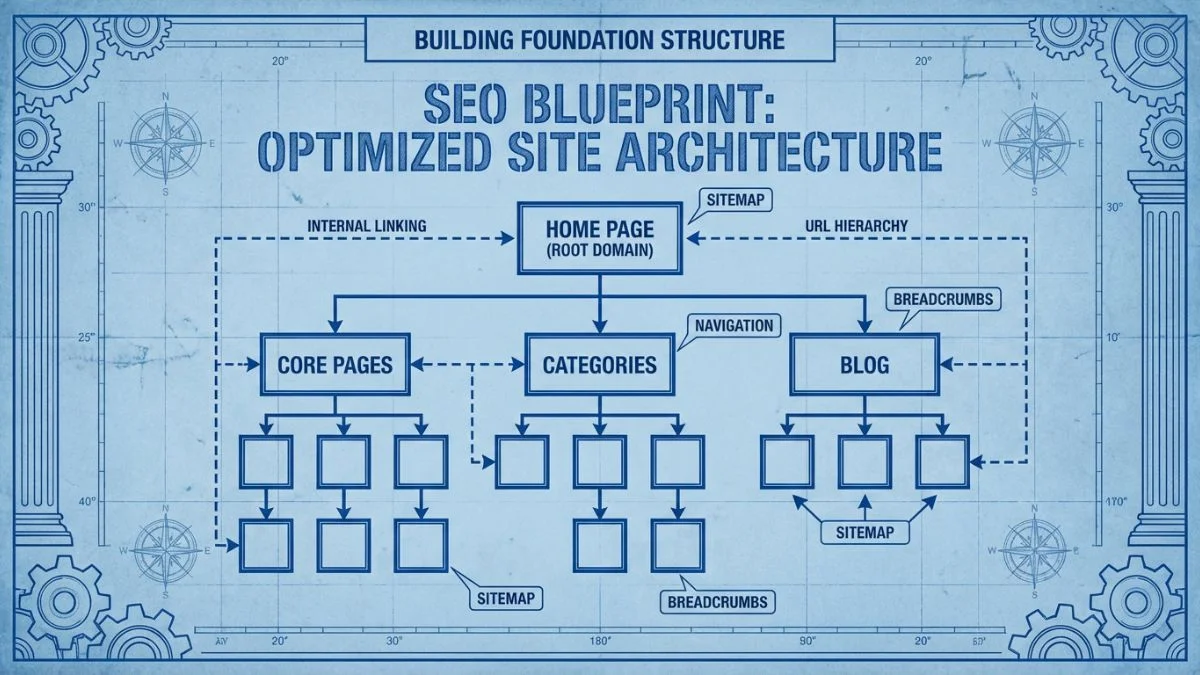
Site architecture (also called information architecture) refers to how your website's pages are organized, structured, and linked together. It encompasses:
- Hierarchy: How pages are categorized and nested
- Navigation: How users move between pages
- URL structure: How URLs reflect the site organization
- Internal linking: How pages connect to one another
- Breadcrumbs: Visual representation of page location
Why Site Architecture Matters for SEO
| Benefit | SEO Impact | User Impact |
|---|---|---|
| Improved Crawlability | Search engines discover and index content faster | N/A |
| Better PageRank Flow | Link equity distributes strategically to important pages | N/A |
| Enhanced Relevancy | Topic clustering signals content authority | Related content easier to discover |
| Faster Indexation | New content discovered and ranked quickly | Fresh content visible immediately |
| Reduced Bounce Rate | Positive user signals improve rankings | Users complete goals more often |
| Sitelinks in SERPs | More search visibility and click-through | Direct access to relevant sections |
💡 Research Findings
A study by Moz found that pages 3+ clicks from the homepage received significantly less organic traffic than those within 2 clicks. Ahrefs research showed that internal linking improvements alone can increase rankings by 25% or more for properly structured sites.
Principles of Good Site Architecture
1. Shallow Depth (The 3-Click Rule)
Every page should be accessible within 3 clicks from your homepage—ideally 2 clicks for important content.
🎯 Why Shallow Depth Matters:
- PageRank distribution: Each click dilutes link equity exponentially
- Crawl priority: Google prioritizes pages closer to homepage
- User behavior: 90% of users won't go beyond 3 clicks
- Indexation likelihood: Deep pages are less likely to be indexed
Crawl Depth Comparison:
| Depth Level | Example | SEO Impact |
| Level 0 | Homepage | ✅ Maximum authority |
| Level 1 | /category/ | ✅ Excellent |
| Level 2 | /category/subcategory/ | ✅ Good |
| Level 3 | /category/subcategory/product/ | ⚠️ Acceptable |
| Level 4+ | /cat/sub/sub2/product/ | ❌ Too deep |
Implementation: Reduce nesting, add category overview pages, use internal linking bridges to reduce click depth.
2. Logical Hierarchy (Tree Structure)
Organize content in a clear parent-child relationship, like a family tree:
📊 Ideal Site Structure:
Homepage (Level 0)
│
├─ Category 1 (Level 1)
│  ├─ Subcategory 1.1 (Level 2)
│  │  ├─ Product/Page 1.1.1 (Level 3)
│  │  └─ Product/Page 1.1.2 (Level 3)
│  └─ Subcategory 1.2 (Level 2)
│     ├─ Product/Page 1.2.1 (Level 3)
│     └─ Product/Page 1.2.2 (Level 3)
│
├─ Category 2 (Level 1)
│  ├─ Subcategory 2.1 (Level 2)
│  └─ Subcategory 2.2 (Level 2)
│
└─ Category 3 (Level 1)
   └─ Subcategory 3.1 (Level 2)
❌ Common Hierarchy Mistakes:
- Too many top-level categories: 15+ main categories dilutes focus
- Inconsistent depth: Some sections 2 levels, others 6 levels deep
- Orphan pages: Important content not linked from anywhere
- Flat architecture: Thousands of pages directly off homepage
- Overlapping categories: Content fits multiple categories ambiguously
Ideal structure: 3-7 main categories, 2-7 subcategories each, consistent depth throughout.
3. Simple, Descriptive URLs
URL structure should mirror your site hierarchy and be human-readable:
✅ Good URL Structure:
https://example.com/category/subcategory/page-name/
https://shop.com/electronics/cameras/canon-eos-r5/
https://blog.com/seo/link-building/guest-posting-guide/
❌ Poor URL Structure:
https://example.com/?id=12345
https://shop.com/prod.php?category=2&item=458
https://blog.com/2026/02/08/p=9834
URL best practices:
- Use hyphens (-) not underscores (_) to separate words
- Keep URLs short and descriptive (3-5 words ideal)
- Use lowercase only (avoid case sensitivity issues)
- Include target keyword naturally
- Avoid stop words (the, and, of) unless necessary for clarity
- Match URL to page hierarchy logically
4. Strong Internal Linking Strategy
Internal links are the connective tissue of site architecture:
| Link Type | Purpose | Implementation |
|---|---|---|
| Navigational Links | Primary site navigation (header/footer) | Link to main categories and important pages |
| Contextual Links | Content-embedded links to related pages | Link to topically relevant content naturally |
| Breadcrumbs | Show hierarchy path from homepage | Home > Category > Subcategory > Page |
| Related Content | Suggest similar pages to users | "Related posts" or "You might also like" widgets |
| Pagination Links | Connect paginated content series | Previous/Next, numbered pagination |
According to research by Search Engine Journal, pages with more internal links pointing to them tend to rank better.
Step-by-Step Site Architecture Audit
Before optimizing, you need to understand your current structure:
Step 1: Visualize Your Current Structure
🕷️ Tools for Site Structure Analysis:
- Crawl Depth Report: Shows how many clicks each page is from homepage
- Link Metrics: Inbound internal links per page
- Orphan Pages: Pages with no internal links
- Tree Graph: Visual site structure diagram
- Free up to 500 URLs, £149/year unlimited
2. Screaming Frog Visualizations
- Interactive force-directed graph of site structure
- Color-code pages by type, depth, or other metrics
- Identify hub pages and isolated content
3. Sitebulb
- Beautiful visual site architecture reports
- Prioritized recommendations for improvements
- Crawl depth and internal link analysis
- From $13/month
4. Gephi (Free)
- Advanced network visualization
- Export Screaming Frog data and visualize in Gephi
- Identify connection patterns and hub pages
Step 2: Analyze Crawl Depth
Use Screaming Frog to export crawl depth report:
📊 Crawl Depth Analysis Steps:
1. Screaming Frog: Mode > Spider > Crawl from: Homepage
2. Complete crawl
3. Reports > Crawl Depth
4. Export report to Excel

Analyze:
- What % of pages are at depth 4+? (Should be <10%)
- Are important pages buried deep? (Product pages, key content)
- Which pages have excessive depth but high importance?
Action items: Identify pages beyond depth 3 that should be promoted to shallower levels.
Step 3: Find Orphan Pages
Orphan pages have no internal links pointing to them—they're invisible to crawlers navigating your site:
⚠️ Finding Orphan Pages:
Method 1: Screaming Frog + Analytics
1. Export all URLs from Google Analytics (has traffic = indexed)
2. Upload list to Screaming Frog: Mode > List
3. Crawl uploaded list
4. Any page NOT discovered in crawl = orphan
Method 2: GSC + Screaming Frog
1. Google Search Console > Index > Pages > Export
2. Upload list to Screaming Frog: Mode > List
3. Crawl uploaded list
4. Orphan pages = indexed but not crawled from site
Fix orphan pages: Add links from relevant category/hub pages, include in navigation/sitemap, or delete if genuinely unnecessary.
Step 4: Evaluate Internal Link Distribution
Check how link equity flows through your site:
💡 Link Distribution Metrics:
- Pages with 0-1 internal links: Likely orphans or near-orphans
- Pages with 100+ inbound links: Hub pages (good!) or boilerplate issues
- Important pages with few links: Opportunity to boost with more internal links
- Average links per page: Healthy sites typically have 30-50 internal links/page
Export from Screaming Frog: Reports > Internal > All Inlinks
Step 5: Map Content Topics
Group content by topic clusters (also called pillar/cluster or hub-spoke model):
📚 Topic Cluster Architecture:
Pillar Page (Hub): Comprehensive guide on broad topic
Example: "Complete Guide to SEO" (3,000+ words)
Cluster Content (Spokes): In-depth articles on specific subtopics
- "How to do keyword research" (links to pillar)
- "On-page SEO checklist" (links to pillar)
- "Link building strategies" (links to pillar)
- "Technical SEO guide" (links to pillar)
Linking Pattern:
- Pillar links to ALL cluster content
- All cluster content links back to pillar
- Cluster pages link to related cluster pages where relevant
This structure signals topical authority to Google and improves rankings for competitive keywords. Learn more about topic clusters from HubSpot.
How to Optimize Site Architecture
Strategy 1: Implement Proper Breadcrumb Navigation
Breadcrumbs show the page's position in your site hierarchy:
🍞 Breadcrumb Implementation:
Visual Example:
Home > Electronics > Cameras > DSLR Cameras > Canon EOS R5HTML with Schema Markup:
<nav aria-label="Breadcrumb">
  <ol itemscope itemtype="https://schema.org/BreadcrumbList">
    <li itemprop="itemListElement" itemscope
        itemtype="https://schema.org/ListItem">
      <a itemprop="item" href="/">
        <span>Home</span>
      </a>
      <meta itemprop="position" content="1" />
    </li>
    <li itemprop="itemListElement" itemscope
        itemtype="https://schema.org/ListItem">
      <a itemprop="item" href="/electronics/">
        <span>Electronics</span>
      </a>
      <meta itemprop="position" content="2" />
    </li>
    <li itemprop="itemListElement" itemscope
        itemtype="https://schema.org/ListItem">
      <a itemprop="item" href="/electronics/cameras/">
        <span>Cameras</span>
      </a>
      <meta itemprop="position" content="3" />
    </li>
    <li itemprop="itemListElement" itemscope
        itemtype="https://schema.org/ListItem">
      <span>Canon EOS R5</span>
      <meta itemprop="position" content="4" />
    </li>
  </ol>
</nav>
Breadcrumb benefits:
- Rich search results (shows in Google listings)
- Reduces bounce rate (easier navigation)
- Internal linking structure boost
- Clarifies site hierarchy for users and bots
Test breadcrumbs with Google's Rich Results Test.
Strategy 2: Create Category Hub Pages
Category pages should be comprehensive hubs, not just lists of products/posts:
✅ Optimized Category Page Elements:
- Unique introductory content: 300-500 words explaining category
- Target keyword naturally: Optimize for category-level keywords
- Links to subcategories: Clear navigation to child categories
- Featured/popular items: Highlight best content/products
- Internal links to related categories: Horizontal navigation
- Rich media: Images, videos relevant to category
- Faceted navigation: Filter options (don't create duplicate content!)
Common mistake: Thin category pages with no unique content—just automatically generated product/post listings. Add value!
Strategy 3: Optimize Internal Linking
Strategic internal linking is perhaps the most powerful architecture tool:
🔗 Internal Linking Best Practices:
1. Use Descriptive Anchor Text
| ❌ Bad: "Click here" or "read more" | ✅ Good: "guide to keyword research" or "learn about technical SEO" |
2. Link from Relevant Content
- Contextual links within content are more valuable than sidebar/footer
- Link when genuinely adding value, not forced keyword stuffing
- First link from a page passes the most value (subsequent links to same URL pass less)
3. Prioritize Important Pages
- High-value pages (conversion-focused, revenue-generating) should have more internal links
- New content should link to established content and vice versa
- Use navigation/footer to boost important evergreen pages
4. Follow a Reasonable Link Ratio
- Google recommends "a reasonable number of links"—historically ~100 per page
- More in-depth content can support more links naturally
- Don't worry about exact count; be natural and user-focused
5. Fix Broken Internal Links
- Broken links waste PageRank and create poor user experience
- Use Screaming Frog or Ahrefs Site Audit to find 404s
- Fix or redirect broken internal links quarterly
Learn more about fixing broken internal links.
Strategy 4: Flatten Overly Deep Structures
If important pages are buried deep, promote them:
| Tactic | When to Use | Implementation |
|---|---|---|
| Reduce Category Nesting | Too many subcategory levels | Combine subcategories, move content up one level |
| Add to Main Navigation | Key pages buried but important | Include in header menu or mega-menu |
| Homepage Links | Critical pages need maximum authority | Link from homepage (Featured section, quick links) |
| Breadcrumb Shortcuts | Deep pagination or filtered views | Breadcrumbs provide shortcut back to category |
| Contextual Cross-Links | Related content in different categories | Link horizontally across silos |
Strategy 5: Implement Mega Menus
For large sites, mega menus provide extensive navigation without depth:
🎯 Mega Menu Best Practices:
- Show 2-3 levels: Main categories → Subcategories → Featured pages
- Limit to 5-7 main categories: Don't overwhelm users
- Include visual elements: Images for categories (improves engagement)
- Highlight popular pages: "Trending," "Popular," or "Featured" sections
- SEO-friendly code: Use semantic HTML (nav, ul, li) not JavaScript-only
- Mobile consideration: Simplify for small screens
Great mega menu examples: Amazon, Wayfair, Target
Strategy 6: Fix URL Structure (If Necessary)
Changing URL structure is risky but sometimes necessary:
⚠️ URL Restructuring Considerations:
When to restructure:
- URLs are confusing/non-descriptive (product IDs only)
- Structure doesn't match current site organization
- Excessive depth built into URLs
- Inconsistent URL patterns across site
Requirements if restructuring:
- Implement 301 redirects from old to new URLs (CRITICAL)
- Update all internal links to new structure
- Submit new XML sitemap to Google Search Console
- Monitor traffic/rankings closely for 4-8 weeks
- Expect temporary rankings fluctuation
Generally better to: Fix internal linking and navigation rather than changing URLs, unless URLs are truly problematic.
Strategy 7: Create an HTML Sitemap
Different from XML sitemap—this is for users AND bots:
💡 HTML Sitemap Benefits:
- User navigation: Quick access to all site sections
- Crawl assistance: Helps bots discover deep pages
- Internal linking boost: Every page gets at least one link
- Accessibility: Helps users with disabilities navigate
Implementation tips:
- Organize hierarchically by category
- Link from footer ("Site Map" link)
- Keep updated automatically (plugin/CMS feature)
- For very large sites, create category-specific sitemaps
Example of well-structured HTML sitemap: Moz's sitemap
Site Architecture for Different Site Types
E-commerce Site Architecture
🛒 E-commerce Structure Example:
Homepage
│
├─ Category Pages (SEO-optimized with unique content)
│  ├─ Subcategory Pages (if needed—avoid too many levels)
│  │  └─ Product Pages
│  └─ Product Pages (for categories without subcategories)
│
├─ Brand Pages (if multi-brand store)
│  └─ Products filtered by brand
│
├─ Content/Blog (for informational queries)
│  └─ Buying guides, how-tos linking to products
│
└─ Utility Pages (About, Contact, Shipping, Returns)
E-commerce challenges:
- Product variations creating duplicates (use canonical tags)
- Faceted navigation creating infinite URL combinations (use robots.txt, parameter handling)
- Out-of-stock products (keep URL, add "coming soon" or redirect to category)
- Seasonal products (maintain URL structure even when not in stock)
Blog/Content Site Architecture
📝 Blog Structure Example:
Homepage
│
├─ Topic Pillars (Hub pages—ultimate guides)
│  ├─ Subtopic Article 1 (links back to pillar)
│  ├─ Subtopic Article 2 (links back to pillar)
│  └─ Subtopic Article 3 (links back to pillar)
│
├─ Categories (broad content groupings)
│  └─ Individual Articles
│
└─ Resources (downloadables, tools, glossary)
Blog architecture tips:
- Use topic clusters for competitive keywords
- Link new posts to relevant older posts (and update old posts to link to new)
- Consider date-less URLs (avoid /2026/02/ structure)
- Create "ultimate guide" pillar pages that rank for head terms
- Use tags sparingly (they often create duplicate/thin content)
Local Business Site Architecture
📍 Local Business Structure:
Homepage (Primary location)
│
├─ Services
│  ├─ Service 1 (with location mentions)
│  ├─ Service 2 (with location mentions)
│  └─ Service 3 (with location mentions)
│
├─ Locations (if multiple)
│  ├─ Location 1 (unique content per location)
│  ├─ Location 2 (unique content per location)
│  └─ Location 3 (unique content per location)
│
├─ About (team, history, certifications)
├─ Reviews/Testimonials
└─ Contact (hours, phone, map)
Local SEO architecture considerations:
- Each location needs unique page with distinct content
- Service pages should mention primary service area
- Create service + location pages for competitive markets
- Embed Google Maps on location pages
- Schema markup for LocalBusiness
Mobile Site Architecture Considerations
With mobile-first indexing, mobile architecture matters more than ever:
📱 Mobile Architecture Best Practices:
- Responsive design preferred: One URL for all devices (simplest to maintain)
- Hamburger menus must be crawlable: Don't hide content in JavaScript-only menus
- Simplify mobile navigation: Prioritize most important links
- Avoid mobile-only content hiding: Google may not see content hidden on mobile
- Fast mobile experience: Site architecture affects page speed (reduce redirects, flatten structure)
- Thumb-friendly navigation: Large tap targets, easy to navigate one-handed
Google's mobile SEO guide provides detailed best practices.
Monitoring Site Architecture Health
Site architecture isn't set-it-and-forget-it—monitor regularly:
| Metric | How to Check | Frequency |
|---|---|---|
| Crawl Depth Distribution | Screaming Frog crawl depth report | Quarterly |
| Orphan Pages | GSC export vs. Screaming Frog crawl | Quarterly |
| Broken Internal Links | Screaming Frog Response Codes report | Monthly |
| Pages Beyond 3 Clicks | Crawl depth analysis | Quarterly |
| Internal Link Distribution | All Inlinks report (SF) | Quarterly |
| Indexation Rate | Google Search Console Index Coverage | Monthly |
Frequently Asked Questions (FAQs)
1. What is the ideal site architecture for SEO?
The ideal site architecture follows a shallow, pyramid-like structure: Homepage at the top, 3-7 main category pages on Level 1, subcategories on Level 2, and content/product pages on Level 3. Every page should be accessible within 3 clicks from the homepage. Use logical hierarchical organization with clear parent-child relationships, descriptive URLs that mirror the structure (/category/subcategory/page), strong internal linking between related content, breadcrumb navigation showing the hierarchy path, and topic clusters for content sites (pillar pages linking to related cluster content). For e-commerce: categories → subcategories → products. For blogs: topic pillars → individual articles. For local businesses: services → location pages. The key principles are: shallow depth (3 clicks max), logical grouping, easy navigation, strong internal linking, and mobile-friendly structure.
2. How many clicks from homepage should pages be?
The "3-click rule" states every page should be accessible within 3 clicks from the homepage—ideally 2 for important content. This matters because: (1) PageRank (link equity) dilutes exponentially with each level of depth, (2) Google prioritizes shallow pages when crawling, (3) Users rarely navigate beyond 3 clicks deep, (4) Deeper pages are less likely to be indexed. Level 0 (homepage) has maximum authority; Level 1 (main categories) excellent; Level 2 (subcategories) good; Level 3 (content pages) acceptable; Level 4+ too deep. If important pages (high-converting products, popular content) are 4+ clicks deep, promote them: add to main navigation, link from homepage, reduce category nesting, or use contextual internal links from popular pages. Exceptions: Very large sites (10,000+ pages) may need strategic depth, but even then, prioritize important content for shallow placement.
3. Should I change my URL structure to improve site architecture?
Generally, NO—changing URLs is risky and often unnecessary. Only restructure URLs if: (1) Current URLs are non-descriptive (just product IDs, no keywords), (2) Structure doesn't reflect actual site organization at all, (3) Excessive depth is baked into URLs (/cat/sub1/sub2/sub3/sub4/product/), (4) Major inconsistencies across the site. If you must change URLs: Implement proper 301 redirects from every old URL to new (CRITICAL), update all internal links site-wide, submit new sitemap to Google Search Console, monitor traffic/rankings closely for 2-3 months, expect temporary fluctuation (usually recovers within 3-6 months). Better approach for most sites: Keep existing URLs but improve architecture through: better internal linking strategy, improved navigation structure, breadcrumb implementation, creating hub/pillar pages, strategic cross-linking. You can have excellent site architecture with imperfect URLs by focusing on how pages connect rather than URL format.
4. What are orphan pages and why are they bad for SEO?
Orphan pages are pages with no internal links pointing to them—they're isolated from the rest of your site structure. They're bad for SEO because: (1) Search engines can't discover them by crawling your site (only via sitemap or external links), (2) They receive no internal PageRank/link equity, (3) They don't benefit from site-wide authority, (4) Users can't navigate to them naturally, (5) They signal poor site organization to Google. To find orphan pages: Export indexed URLs from Google Search Console, crawl your site with Screaming Frog starting from homepage, compare the lists—pages in GSC but not found in crawl are orphans. To fix: Add links from relevant category or hub pages, include in navigation if important, add to HTML sitemap, ensure they're in XML sitemap, or delete/noindex if genuinely unnecessary. Legitimate exceptions: Temporary campaign landing pages (linked from ads only), admin/utility pages (intentionally isolated), pages in staging/development.
5. How important are breadcrumbs for SEO?
Breadcrumbs are quite important and offer multiple SEO benefits: (1) Rich search results—Google displays breadcrumbs in place of URL in search listings (better visibility, higher CTR), (2) Internal linking structure—creates natural link hierarchy flowing from homepage → category → page, (3) Crawl clarity—helps Google understand site structure and page relationships, (4) User experience—reduces bounce rate by making navigation easier, (5) PageRank distribution—ensures even deep pages maintain connection to homepage. Implementation matters: Use proper schema.org BreadcrumbList structured data, make breadcrumbs clickable HTML links (not just visual elements), reflect actual site hierarchy in breadcrumb path, place prominently near top of page. Test with Google's Rich Results Test to ensure proper display. Impact: Sites with breadcrumbs often see improved click-through rates in search results and better rankings for deep pages. Breadcrumbs are especially valuable for e-commerce sites, large content sites, and any site with 3+ levels of hierarchy.
6. What's the difference between site architecture and site map?
Site Architecture: The overall organizational structure of your website—how pages are hierarchically arranged, categorized, and linked together. It encompasses navigation, internal linking, URL structure, hierarchy depth, and information organization. Architecture is the foundation that affects crawlability, user experience, and SEO. XML Sitemap: A file (sitemap.xml) listing all indexable URLs on your site, submitted to search engines to aid discovery. It's a supplement to crawling, not a replacement for good architecture. HTML Sitemap: A user-facing page listing links to major sections/pages of your site, organized hierarchically. Helps both users and crawlers navigate. Relationship: Good architecture makes sitemaps less critical (but still recommended). Poor architecture can't be fixed by a sitemap alone. Think of architecture as the building blueprint, XML sitemap as the directory, and HTML sitemap as the building map. Best practice: Implement strong architecture WITH both XML and HTML sitemaps.
7. How do I implement topic clusters for better site architecture?
Topic Cluster Model: Create a hierarchical content structure with one pillar page and multiple cluster pages. Step 1: Identify Topic Pillars: Choose broad topics relevant to your business (e.g., "Content Marketing," "Email Marketing," "SEO"). Step 2: Create Pillar Content: Write comprehensive guide (3,000-5,000 words) covering the broad topic at high level—this is your pillar/hub page. Step 3: Identify Cluster Topics: Break pillar topic into specific subtopics—each becomes a cluster article (e.g., pillar: "SEO," clusters: "keyword research," "on-page SEO," "link building," "technical SEO"). Step 4: Create Cluster Content: Write in-depth articles (1,500-3,000 words) on each cluster topic. Step 5: Implement Internal Linking: Every cluster article links back to the pillar (descriptive anchor text), pillar links to ALL cluster articles, cluster articles link to related clusters where relevant. Benefits: Signals topical authority to Google, improves rankings for competitive keywords, enhances user experience, better internal link distribution.
8. Can poor site architecture hurt my rankings even with good content?
Yes, absolutely. Poor architecture can severely limit the performance of even excellent content. How it hurts rankings: (1) Deep pages don't get crawled/indexed—Google may never discover your best content buried 5+ clicks deep, (2) Link equity dilution—authority doesn't flow to important pages, (3) Confuses topical relevance—unclear site structure makes it harder for Google to understand what you're an authority on, (4) Slow indexation—new content takes weeks/months to rank instead of days, (5) Poor user signals—high bounce rate and low engagement from navigation difficulty, (6) Crawl budget waste—Google wastes resources on duplicate/thin pages instead of valuable content. Real-world example: A client had excellent product guides but buried 4 clicks deep. Simply adding links from homepage and reducing depth to 2 clicks increased organic traffic by 40% with no content changes. Balance needed: Think of architecture as the foundation and content as the house—you need both for success. Fix architecture first, then create content.
9. How often should I audit my site architecture?
Full architecture audit: Quarterly (every 3 months) to identify structural issues before they become major problems. Quick checks: Monthly for broken links, orphan pages, and crawl errors. After major changes: Immediately after site redesigns, CMS migrations, adding new sections, or significant content additions. What to check quarterly: Crawl depth distribution (Screaming Frog depth report), orphan pages (compare GSC to crawl), internal link distribution (identify pages with too few/many links), broken internal links (404s), pages beyond 3-click depth, indexation rate (GSC Index Coverage), crawl efficiency (GSC crawl stats). What to check monthly: New broken links, new orphan pages from recent content, GSC coverage errors, major ranking fluctuations (may indicate architecture issues). Automation: Set up monitoring with tools like Lumar/DeepCrawl for continuous tracking, GSC alerts for indexation issues, rank tracking for important pages. Documentation: Keep spreadsheet tracking changes over time to identify trends.
10. Should category pages have unique content or just list products/articles?
Definitely add unique content—category pages should be optimized hub pages, not just automated listings. Why unique content matters: (1) Thin category pages (just product listings) rarely rank well, (2) Unique content helps you rank for category-level keywords, (3) Provides value to users (explain what's in category, help them choose), (4) Reduces duplicate content risk (especially if multiple filters create similar listings), (5) Signals to Google this is a valuable landing page worth ranking. What to include: 300-500 words explaining category (above or below listings), value proposition (why shop this category), buying guide or selection tips, links to subcategories and related categories, featured/popular products/articles, FAQ relevant to category, unique images or videos, clear H1 with target keyword. E-commerce example: Camera category page should explain camera types, what to consider when choosing, featured brands, price ranges, and link to subcategories (DSLR, Mirrorless, Point-and-Shoot) rather than just listing 500 camera products with no context.
Conclusion: Architecture as SEO Foundation
Site architecture is often overlooked in favor of content creation and link building, but it's the foundation that makes everything else work. A well-structured site ensures your best content gets discovered, crawled, indexed, and ranked. It distributes authority strategically, creates excellent user experience, and signals topical authority to search engines.
🎯 Your Site Architecture Action Plan:
- Audit Current Structure: Use Screaming Frog to analyze depth, orphans, internal links
- Identify Issues: Find pages 4+ clicks deep, orphans, broken links, thin categories
- Plan New Structure: Sketch ideal hierarchy (3-7 categories, max 3-click depth)
- Implement Gradually: Fix internal linking, add breadcrumbs, optimize navigation
- Monitor Impact: Track indexation, rankings, traffic over 2-3 months
- Maintain: Quarterly audits to ensure structure stays optimized
🏗️ Optimize Your Site Architecture
Use our architecture analysis tools to audit your site structure automatically.
Related technical SEO guides:
For more technical SEO guidance, explore our guides on canonical tags, technical SEO secrets, and XML sitemap optimization.
About Bright SEO Tools: We provide comprehensive site architecture analysis, crawl depth reports, internal linking suggestions, and full technical SEO audits. Visit brightseotools.com for free site structure analysis, orphan page detection, and internal link optimization tools. Check our premium plans for automated crawling, continuous monitoring, and architectural recommendations. Contact us for enterprise site architecture consulting and implementation.