XML Sitemap Best Practices for SEO

XML Sitemap Best Practices for SEO: The Complete Guide for 2026
If you have ever wondered why some of your best content takes weeks to show up in Google search results while competitor pages get indexed within hours, the answer might be sitting in a single file on your server: the XML sitemap. Despite being one of the oldest tools in the SEO toolkit, XML sitemaps remain one of the most misunderstood and frequently misconfigured elements of technical SEO.
In this in-depth guide, we are going to walk through every aspect of XML sitemap optimization for 2026. Whether you are managing a small business website with fifty pages or an enterprise e-commerce platform with millions of product listings, the principles outlined here will help you get the most out of this foundational SEO tool. We will cover the technical structure, creation methods, submission strategies, monitoring techniques, and the most common mistakes that webmasters make.
Let us start with the fundamentals and work our way up to advanced strategies that can give you a real competitive edge.
What Is an XML Sitemap and Why Does It Matter?
An XML sitemap is essentially a roadmap of your website, written in Extensible Markup Language (XML), that helps search engines understand the structure and content of your site. Think of it as handing Google a table of contents for your entire website rather than forcing it to wander through your pages hoping to find everything.
The concept was formalized in 2005 when sitemaps.org published the Sitemap Protocol, which was jointly supported by Google, Yahoo, and Microsoft. Since then, it has become a universal standard that all major search engines support. According to Google Search Central, sitemaps are particularly beneficial in the following scenarios:
- Large websites with thousands of pages where crawlers might miss new or recently updated content
- New websites with few external backlinks, making discovery through link-following difficult
- Websites with rich media content such as images and videos that benefit from additional metadata
- Sites with isolated pages that are not well-connected through internal linking
- News websites that publish time-sensitive content requiring rapid indexing
The importance of XML sitemaps extends beyond simple URL discovery. They communicate valuable metadata to search engines, including when a page was last updated, how frequently it changes, and its relative priority compared to other pages on your site. When configured properly, this information helps search engines allocate their crawl budget more efficiently, ensuring your most important pages get crawled and indexed first.
XML Sitemap Structure and Syntax Explained
Understanding the anatomy of an XML sitemap is essential before you start optimizing one. Every valid XML sitemap follows a specific structure defined by the Sitemap Protocol 0.9. Let us break down the key elements.
Basic XML Sitemap Structure
Here is what a standard XML sitemap looks like at its most basic level:
Let us examine each of the tags available in the Sitemap Protocol:
| Tag | Required | Description | Example Value |
|---|---|---|---|
<urlset> |
Yes | Root element that encapsulates all URL entries and declares the namespace | xmlns="http://www.sitemaps.org/schemas/sitemap/0.9" |
<url> |
Yes | Parent tag for each URL entry in the sitemap | Container element |
<loc> |
Yes | The full URL of the page, including protocol (https://) | https://example.com/page |
<lastmod> |
No | Date the page was last modified in W3C Datetime format | 2026-02-08 |
<changefreq> |
No | How frequently the page is likely to change | daily, weekly, monthly |
<priority> |
No | Relative priority of the URL compared to other URLs (0.0 to 1.0) | 0.8 |
The <loc> tag is the only truly essential piece of data within each <url> block. The other three tags provide optional metadata that can influence crawl behavior. However, as we will discuss later, not all of these optional tags carry equal weight in the eyes of modern search engines.
URL Requirements and Formatting Rules
Every URL you include in your sitemap must follow specific formatting guidelines as outlined in the Sitemap Protocol specification. Getting these wrong can result in parsing errors that render your entire sitemap useless.
URLs must begin with the protocol (http:// or https://) and must be fully qualified. Relative URLs like /about-us are not valid. Special characters need to be entity-escaped: ampersands become &, single quotes become ', and so on. The URL must also match the domain of the sitemap location. A sitemap hosted at https://example.com/sitemap.xml cannot include URLs from https://other-domain.com/.
For websites using both www and non-www versions, or HTTP and HTTPS, you need to ensure consistency. Your sitemap URLs should match your canonical domain. If your site uses https://www.example.com, every URL in the sitemap should use that exact prefix. This consistency is a core principle of good URL structure for SEO.
Sitemap Index Files: Managing Large Websites
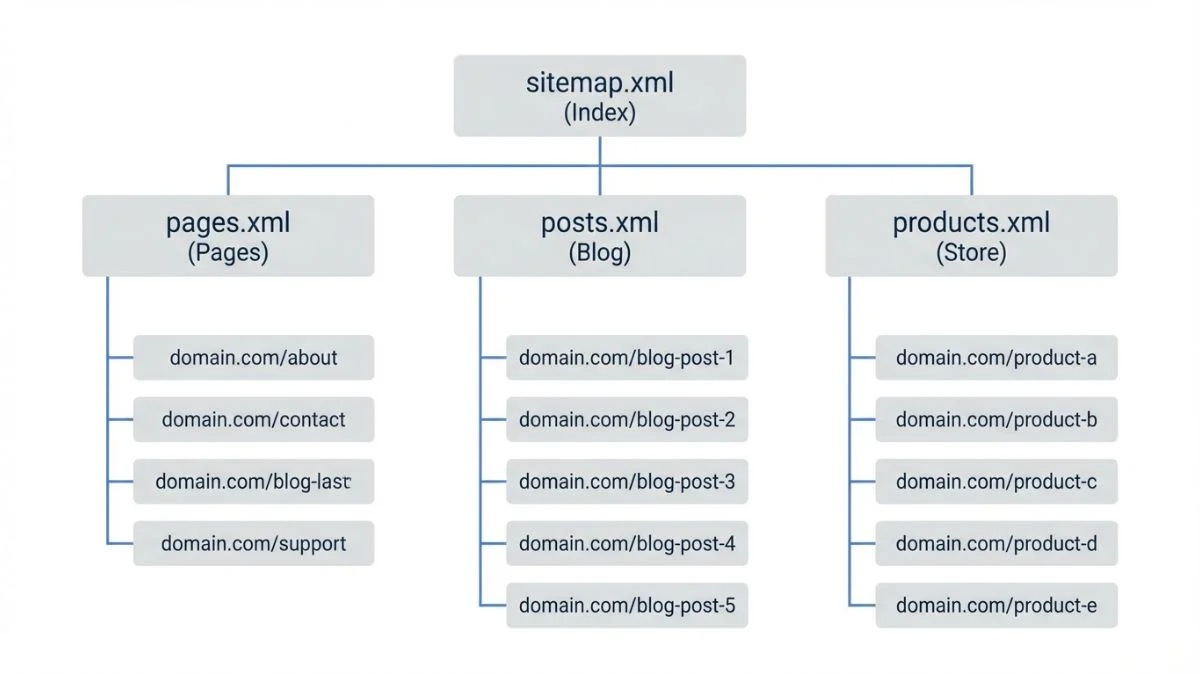
When your website grows beyond the 50,000 URL limit for a single sitemap file, you need to use a sitemap index file. This is essentially a sitemap of sitemaps, a master file that points to multiple individual sitemap files.
Sitemap Index Structure
A sitemap index file can reference up to 50,000 individual sitemap files. Since each individual sitemap can hold 50,000 URLs, this means you can theoretically map up to 2.5 billion URLs using a single sitemap index. That is more than enough for even the largest websites on the internet.
Many SEO professionals recommend organizing your sub-sitemaps logically by content type. For instance, you might have separate sitemaps for blog posts, product pages, category pages, and static pages. This organization makes it much easier to monitor indexing performance and troubleshoot issues for specific content types. Tools like Screaming Frog SEO Spider make it straightforward to audit your sitemap structure and identify organizational improvements.
Best Practices for Sitemap Index Organization
| Sitemap Type | Typical File Name | Content Included | Update Frequency |
|---|---|---|---|
| Main Pages | sitemap-pages.xml | Homepage, About, Contact, Services | Monthly |
| Blog Posts | sitemap-posts.xml | All published blog articles | Daily or Weekly |
| Products | sitemap-products.xml | All active product pages | Daily |
| Categories | sitemap-categories.xml | Category and tag archive pages | Weekly |
| Images | sitemap-images.xml | Image URLs with metadata | Weekly |
| Videos | sitemap-videos.xml | Video pages with structured data | Weekly |
| News | sitemap-news.xml | Articles published within last 48 hours | Continuously |
Types of XML Sitemaps You Should Know
While most people think of a single sitemap file when they hear the term, there are actually several specialized types of XML sitemaps designed for different content formats. Each type serves a distinct purpose and uses its own XML namespace extensions. Understanding these types allows you to provide search engines with richer information about your content.
1. Standard Page Sitemap
This is the most common type of XML sitemap and the one most webmasters are familiar with. It lists the URLs of regular web pages, such as landing pages, blog posts, product pages, and informational content. The standard page sitemap uses the base Sitemap Protocol namespace and includes the tags we discussed earlier: <loc>, <lastmod>, <changefreq>, and <priority>.
For most websites, a well-maintained page sitemap is the single most important sitemap file. It should include all canonical, indexable URLs that you want search engines to find. Use your XML sitemap generator to create one automatically by crawling your website.
2. Image Sitemap
Image sitemaps extend the standard protocol with an additional namespace to provide information about images hosted on your pages. This is particularly valuable for photographers, e-commerce sites, design portfolios, and any website where image search traffic represents a meaningful portion of organic visits.
According to Google's image sitemap documentation, you can include up to 1,000 images per page entry. Here is an example of the image sitemap syntax:
3. Video Sitemap
Video sitemaps help search engines discover and understand video content on your site. They are essential for appearing in Google Video search results and the video carousel in standard search results. The video sitemap specification allows you to provide detailed metadata including title, description, thumbnail URL, duration, and expiration date.
4. News Sitemap
News sitemaps are specifically designed for sites included in Google News. They follow a dedicated namespace and include information like the publication name, language, and publication date. News sitemaps should only contain articles published within the last 48 hours, as Google News has strict recency requirements.
Comparison of Sitemap Types
Search Engine Support by Sitemap Type
How to Create XML Sitemaps: Methods and Tools
There are several approaches to creating XML sitemaps, ranging from fully automated CMS plugins to manual creation for static websites. The best method depends on your website's platform, size, and how frequently your content changes. Let us explore each approach in detail.
Method 1: CMS Plugins and Built-In Features
If you are running a content management system like WordPress, Shopify, or Drupal, using a plugin or built-in feature is by far the easiest and most reliable approach. These solutions automatically generate and update your sitemap whenever you publish, modify, or delete content.
For WordPress, the most popular options include Yoast SEO, which has been the gold standard for WordPress sitemap generation since its early versions, and Rank Math, which offers more granular control over sitemap settings. As of WordPress 5.5 and later, WordPress also includes a basic built-in sitemap feature at /wp-sitemap.xml, though most SEO professionals prefer the additional control offered by dedicated plugins.
Shopify generates XML sitemaps automatically at /sitemap.xml, which is actually a sitemap index that links to individual sitemaps for products, collections, blogs, and pages. While Shopify's built-in sitemap handles the basics well, it does have limitations. You cannot exclude specific URLs or customize the structure without using third-party apps or custom Liquid code.
Method 2: Online Sitemap Generators
Online sitemap generators crawl your website and produce an XML sitemap file that you can download and upload to your server. This method works well for small to medium-sized static websites. Our free XML sitemap generator at Bright SEO Tools can crawl up to 5,000 pages and produce a standards-compliant sitemap file within minutes.
Other popular online generators include XML-Sitemaps.com and Screaming Frog's sitemap generator. The advantage of using a crawler-based generator is that it discovers URLs the same way a search engine would, by following links from your homepage. This means your sitemap will naturally reflect the pages that are accessible through your site's navigation and internal linking structure.
Method 3: Server-Side Dynamic Generation
For large or dynamic websites, generating sitemaps programmatically on the server side is often the best approach. This method ensures your sitemap is always up to date without manual intervention. Here is a simplified example of how you might generate a sitemap dynamically using Python:
Popular frameworks have dedicated sitemap libraries. Django has django.contrib.sitemaps, Ruby on Rails has the sitemap_generator gem, and Node.js developers can use packages like sitemap on npm. These libraries handle XML formatting, URL encoding, gzip compression, and automatic sitemap splitting when you exceed the 50,000 URL limit.
Method 4: Manual Creation
For very small websites with fewer than 50 pages that rarely change, manually creating an XML sitemap is a viable option. You simply write the XML by hand in a text editor, following the structure shown earlier. While this approach requires no special tools, it is error-prone and becomes unmanageable as your site grows. We only recommend this method for personal websites, small portfolios, or situations where you need a quick, one-time sitemap.
Submitting Your Sitemap to Search Engines
Creating a great XML sitemap is only half the battle. You also need to make sure search engines know where to find it. There are three primary methods for notifying search engines about your sitemap, and we recommend using all three for maximum coverage.
Google Search Console Submission
The most direct way to submit your sitemap to Google is through Google Search Console. After verifying your property, navigate to the "Sitemaps" section in the left sidebar. Enter the URL of your sitemap (typically /sitemap.xml or /sitemap_index.xml) and click "Submit." Google will process your sitemap and report back on the number of URLs discovered, any errors encountered, and the indexing status of the submitted URLs.
Google Search Console also provides ongoing monitoring of your sitemap. You can see when Google last read your sitemap, how many URLs it found, and how many of those URLs are actually indexed. This data is invaluable for diagnosing indexing problems. If you notice a significant gap between submitted URLs and indexed URLs, it is a signal that something needs investigation. Use our website SEO score checker alongside Search Console to get a comprehensive view of your site's technical health.
Bing Webmaster Tools Submission
Bing Webmaster Tools offers a similar submission process. While Bing's market share is smaller than Google's, it still accounts for a meaningful percentage of search traffic, especially in enterprise and B2B environments where many users are on Microsoft Edge or Windows default search settings. Bing also powers search results for Yahoo, DuckDuckGo (partially), and several other search engines, so submitting to Bing has a broader impact than you might expect.
Robots.txt Declaration
Adding a sitemap reference to your robots.txt file is a passive but effective way to inform any search engine crawler about your sitemap's location. Simply add the following line to the end of your robots.txt file:
This method has the advantage of being discoverable by any crawler that reads your robots.txt file, including search engines you may not have manually submitted to. According to Moz's robots.txt guide, the Sitemap directive in robots.txt is recognized by all major search engines and is considered a best practice regardless of whether you have also submitted your sitemap through webmaster tools.
Sitemap Size Limits and Performance Considerations
Understanding the technical constraints of XML sitemaps is critical for avoiding parsing failures and ensuring optimal crawl performance. The Sitemap Protocol defines two hard limits that you must respect:
| Constraint | Limit | Impact of Exceeding | Solution |
|---|---|---|---|
| Maximum URLs per sitemap | 50,000 URLs | Sitemap will be rejected by search engines | Split into multiple sitemaps with an index file |
| Maximum file size (uncompressed) | 50 MB | Parsing errors or partial processing | Split into smaller files or use gzip compression |
| Maximum sitemaps in index | 50,000 sitemaps | Additional sitemaps will be ignored | Use multiple sitemap index files |
| File encoding | UTF-8 | XML parsing failure | Ensure server returns proper encoding headers |
In practice, you should aim to keep individual sitemap files well below these limits. A sitemap with 10,000 to 20,000 URLs is generally an ideal size, balancing completeness with performance. Smaller files download faster, parse more quickly, and are easier to debug when issues arise.
Gzip Compression
You can serve your sitemap files with gzip compression to reduce file size and improve download speed. A gzipped sitemap typically uses the .xml.gz extension. According to Google's sitemap documentation, compressed sitemaps are fully supported and are recommended for large files. Compression ratios of 70-90% are common for XML files, meaning a 40MB sitemap might compress down to just 4-8MB.
When using gzip compression, make sure your server is configured to return the correct Content-Encoding: gzip header so that search engine crawlers can decompress the file properly.
What to Include and Exclude in Your XML Sitemap
One of the most common mistakes webmasters make is treating the sitemap as a dump of every URL on their site. In reality, your sitemap should be a carefully curated list of pages that you want search engines to index. The quality of your sitemap directly affects how efficiently search engines can crawl your site and how effectively they can allocate their crawl budget.
URLs to Include
- All canonical, indexable pages that return a 200 HTTP status code
- High-quality content pages (blog posts, articles, guides)
- Product pages with unique content
- Important category and landing pages
- Service pages and core informational pages
- Pages that are difficult to reach through internal linking
- Recently updated or newly published pages
URLs to Exclude
- Pages with a
noindexmeta robots tag or X-Robots-Tag header - URLs blocked by robots.txt
- Redirected URLs (301 or 302 redirects)
- Duplicate pages (non-canonical versions)
- Paginated archive pages (page/2/, page/3/, etc.) unless they offer unique value
- Internal search result pages
- URLs with session IDs, tracking parameters, or sort/filter parameters
- Login, registration, and account management pages
- Thank-you and confirmation pages
- Admin, staging, and development pages
- Thin content pages with little or no unique value
- Soft 404 pages (pages that return 200 but show error content)
A clean sitemap signals to search engines that you are intentional about what you want indexed. As Ahrefs explains in their sitemap guide, including non-indexable URLs wastes crawl budget and dilutes the signal quality of your sitemap. When Google sees that your sitemap consistently points to high-quality, indexable pages, it develops more trust in your sitemap data and may prioritize crawling the URLs you list.
You can use the spider simulator tool at Bright SEO Tools to check how search engines see each of your pages before adding them to the sitemap. This helps you catch noindex tags, redirect chains, and other issues that would make a URL unsuitable for sitemap inclusion.
Understanding lastmod, changefreq, and priority Tags
The three optional metadata tags in the Sitemap Protocol have been the subject of considerable debate in the SEO community. Let us clarify what each one does and how much weight search engines actually give them in 2026.
The lastmod Tag: Use It, But Use It Honestly
The <lastmod> tag indicates when a page was last meaningfully modified. Google's John Mueller and Gary Illyes have confirmed that Google does use the lastmod tag, but only when it is accurate. If Google discovers that your lastmod dates are unreliable, such as when every page shows today's date regardless of actual changes, it will simply ignore the tag for your entire site.
Best practices for lastmod:
- Only update lastmod when you make a substantive content change, not for minor CSS tweaks or sidebar widget updates
- Use the W3C Datetime format:
YYYY-MM-DDor the full datetime formatYYYY-MM-DDThh:mm:ss+00:00 - Automate lastmod updates through your CMS so they reflect actual database modification timestamps
- Never set all pages to the same lastmod date as a blanket update
The changefreq Tag: Largely Ignored
The <changefreq> tag is meant to indicate how often a page's content is likely to change. Valid values include: always, hourly, daily, weekly, monthly, yearly, and never. However, Google has publicly stated that it largely ignores this tag. Google's Gary Illyes said on social media that Google "mostly ignores changefreq and priority" in sitemaps. Semrush's sitemap guide confirms this, noting that Google determines crawl frequency based on its own observations of how often a page actually changes, rather than relying on the webmaster's self-reported estimates.
While including changefreq will not hurt your SEO, it provides minimal benefit for Google crawling. However, other search engines like Bing and Yandex may still use it as a signal, so there is no harm in including it if your sitemap generator adds it automatically.
The priority Tag: A Self-Reported Metric
The <priority> tag assigns a relative importance to a URL compared to other URLs on the same site, using a scale from 0.0 (least important) to 1.0 (most important). The default value is 0.5. Like changefreq, Google has indicated that it does not use the priority tag as a meaningful ranking signal. The reason is simple: since webmasters set these values themselves, there is an obvious incentive to mark everything as high priority, which renders the data unreliable.
That said, priority values can still be useful for your own internal analysis. If you generate your sitemap programmatically, you can use priority values as a way to categorize pages by their business importance, even if search engines do not use the data directly.
Dynamic Sitemaps for Large and Enterprise Websites
Managing XML sitemaps for websites with hundreds of thousands or millions of pages requires a different approach than what works for smaller sites. Static sitemap files generated once and uploaded to the server simply do not scale when your content changes by the minute. Enterprise-level sitemap management demands dynamic generation, intelligent segmentation, and automated quality control.
Real-Time Sitemap Generation
Large e-commerce platforms, marketplaces, and news publishers typically generate their sitemaps dynamically from a database query. When a search engine requests /sitemap.xml, the server queries the database for current, indexable URLs and generates the XML response on the fly. This ensures the sitemap is always up to date without requiring a separate build or deploy step.
To handle the performance implications of generating large sitemaps on every request, most implementations use one of these caching strategies:
- Time-based caching: Generate the sitemap once per hour or per day and serve the cached version for subsequent requests
- Event-driven regeneration: Regenerate the sitemap whenever a page is published, updated, or deleted, and cache until the next change
- Incremental updates: Only regenerate the specific sub-sitemap that was affected by a content change, leaving other sub-sitemaps untouched
Segmentation Strategies
For large sites, how you segment your sitemaps can have a meaningful impact on crawl efficiency. Research from Botify has shown that search engines tend to crawl URLs from smaller, well-organized sitemaps more efficiently than those listed in large, monolithic files.
Common segmentation approaches include:
- By content type: Products, categories, blog posts, user profiles
- By section or subdirectory: /shoes/, /electronics/, /clothing/
- By update frequency: Frequently updated pages in one sitemap, rarely changed pages in another
- By indexing priority: High-value pages that you want crawled first in a separate sitemap
- Alphabetically or numerically: sitemap-products-1.xml through sitemap-products-50.xml
The key is choosing a segmentation strategy that aligns with how you want to monitor and optimize your site's indexing. If you organize sitemaps by content type, you can quickly see in Google Search Console whether your product pages are being indexed at a different rate than your blog posts, which gives you actionable intelligence for improving your site architecture.
Common XML Sitemap Mistakes and How to Fix Them
After auditing thousands of websites, we have compiled a list of the most frequently encountered XML sitemap errors. Many of these are surprisingly common even on well-established websites run by experienced teams. Avoiding these mistakes can dramatically improve your crawl efficiency and indexing performance.
Mistake 1: Including Non-Canonical URLs
This is arguably the most damaging sitemap mistake. When you include both the canonical and non-canonical versions of a URL (for example, both /product?color=blue and /product), you force search engines to spend crawl budget on duplicate content and sort out which version to index. Always ensure that every URL in your sitemap matches the canonical URL specified in the page's <link rel="canonical"> tag.
Mistake 2: Stale Sitemaps with Dead URLs
Many websites set up a sitemap once and never update it. Over time, as pages are deleted, moved, or restructured, the sitemap accumulates dead URLs that return 404 errors. As we mentioned earlier, a high error rate degrades the overall trustworthiness of your sitemap in the eyes of search engines.
Mistake 3: Protocol and Domain Mismatches
If your site uses HTTPS but your sitemap lists HTTP URLs, or if your site redirects from non-www to www but your sitemap uses non-www URLs, you are creating unnecessary redirect chains that waste crawl budget. Every URL in your sitemap should use the exact protocol and domain that your site resolves to after all redirects.
Mistake 4: Missing Sitemap Reference in Robots.txt
Surprisingly, many websites fail to include a Sitemap directive in their robots.txt file. While this is not technically an error, it means you are relying solely on manual submission through webmaster tools for search engine discovery. Adding the Sitemap directive to robots.txt is a simple one-line addition that provides an extra layer of discoverability.
Mistake 5: Exceeding Size Limits Without Splitting
Some sitemap generators create a single massive file that exceeds the 50,000 URL or 50MB limit. When this happens, search engines may truncate the file or reject it entirely, leaving a portion of your URLs undiscovered. Always verify your sitemap file size and URL count, and implement a sitemap index if needed.
Mistake 6: Not Validating XML Syntax
Even a single unclosed tag or an unescaped special character can render your entire sitemap unparseable. XML is strict about syntax. Always validate your sitemap against the Sitemap Protocol schema before deploying it. Tools like the XML Sitemaps Validator or the built-in validation in Google Search Console can catch syntax errors before they cause problems.
Impact of Common Sitemap Errors on Crawl Efficiency
Estimated Crawl Budget Waste by Error Type
WordPress XML Sitemap Setup: A Step-by-Step Guide
WordPress remains the most popular CMS in the world, powering over 43% of all websites as of early 2026. Setting up an optimized XML sitemap on WordPress is straightforward, but there are some important nuances that many site owners overlook.
Using Yoast SEO for Sitemap Generation
Yoast SEO automatically generates a sitemap index at /sitemap_index.xml that links to individual sitemaps for posts, pages, categories, tags, and any custom post types. Here is how to configure it properly:
- Install and activate Yoast SEO from the WordPress plugin repository
- Navigate to SEO > General > Features and ensure the "XML sitemaps" toggle is enabled
- Click the question mark icon next to the toggle, then "See the XML sitemap" to verify it is working
- Go to SEO > Search Appearance to configure which post types and taxonomies should be included
- For post types or taxonomies you do not want indexed, set them to "No" under "Show in search results" — Yoast will automatically exclude them from the sitemap
- Submit your sitemap URL (
https://yourdomain.com/sitemap_index.xml) to Google Search Console
Yoast handles most sitemap best practices automatically: it excludes noindex pages, limits each sub-sitemap to 1,000 URLs for optimal performance, generates proper XML formatting, and updates sitemaps dynamically whenever content changes. For more advanced WordPress optimization tips, check out our guide on technical SEO secrets.
WordPress Core Sitemap vs. Plugin Sitemaps
Since WordPress 5.5, the core software includes a basic sitemap feature accessible at /wp-sitemap.xml. While functional, it lacks many features that SEO professionals need, such as the ability to exclude specific URLs, add lastmod dates, or integrate with other SEO settings. If you are using Yoast, Rank Math, or All in One SEO, their sitemaps will take priority, and you should disable the core sitemap to avoid conflicts. Most SEO plugins disable the core sitemap automatically.
Common WordPress Sitemap Issues
Even with a quality plugin, WordPress sitemaps can run into problems. Watch out for:
- Permalink structure conflicts: If your permalinks are set to "Plain" (using query parameters), your sitemap URLs will use the ugly format. Switch to a descriptive permalink structure
- Plugin conflicts: Running multiple SEO plugins can generate duplicate sitemaps. Only use one sitemap generator at a time
- Server caching issues: Aggressive server-side caching (Varnish, Nginx caching) can serve stale sitemaps. Configure your cache to respect sitemap update signals
- Large site performance: On sites with tens of thousands of posts, sitemap generation can cause performance issues. Consider using a dedicated sitemap plugin designed for high-performance environments
Shopify XML Sitemap Setup and Optimization
Shopify generates XML sitemaps automatically, which is both a blessing and a limitation. Understanding how Shopify's built-in sitemap works, and what you can and cannot customize, is essential for Shopify store owners who want to maximize their SEO performance.
How Shopify Sitemaps Work
Every Shopify store has a sitemap index at /sitemap.xml that references four individual sitemaps:
sitemap_products_1.xml— All published products with their imagessitemap_pages_1.xml— All published custom pagessitemap_collections_1.xml— All published collectionssitemap_blogs_1.xml— All published blog posts
Shopify automatically includes the <lastmod> tag for each URL and uses the image sitemap namespace to include product images. These sitemaps are generated automatically and updated whenever you publish, update, or remove content through the Shopify admin.
Shopify Sitemap Limitations
The main frustration for SEO-focused Shopify users is the lack of control over sitemap contents. Unlike WordPress, where you can fine-tune exactly which URLs are included, Shopify's built-in sitemap automatically includes all published pages, products, collections, and blog posts. You cannot exclude specific URLs or add custom URLs without resorting to workarounds.
If you need to exclude a page from Shopify's sitemap, the only native option is to unpublish it, which also removes it from your store entirely. For more granular control, third-party apps in the Shopify App Store can help you generate custom sitemaps with inclusion and exclusion rules.
Monitoring Your Sitemap Performance
Setting up your sitemap is not a one-and-done task. Ongoing monitoring is essential to ensure your sitemap continues to serve its purpose effectively. Here are the key metrics and tools you should be tracking.
Google Search Console Sitemap Reports
Google Search Console provides the most authoritative data on how Google processes your sitemap. In the Sitemaps report, you can see:
- Status: Whether Google was able to successfully read your sitemap (Success, Has errors, Couldn't fetch)
- Last read date: When Google last downloaded and processed your sitemap
- Discovered URLs: The total number of URLs Google found in your sitemap
In the separate Pages report (formerly Coverage report), you can filter by sitemap to see how many of your submitted URLs are actually indexed, how many have errors, how many are excluded and why, and how many are valid but not indexed. This last category, "Discovered - currently not indexed" and "Crawled - currently not indexed," is particularly important to monitor. A growing number of pages in these categories may indicate quality issues with your content or SEO issues that need fixing.
Third-Party Monitoring Tools
Several professional SEO tools offer sitemap monitoring features that go beyond what Google Search Console provides:
- Ahrefs Site Audit can crawl your site and compare discovered URLs against your sitemap to find discrepancies
- Semrush Site Audit includes sitemap-specific checks that flag common issues automatically
- Screaming Frog SEO Spider can validate sitemap files, check all URLs for status codes, and export detailed reports
- ContentKing provides real-time monitoring of your sitemap and alerts you to changes or errors as they happen
- Lumar (formerly DeepCrawl) offers enterprise-grade sitemap analysis with historical trend data
We also recommend using our website SEO score checker to get a quick overview of your site's technical health, including sitemap-related issues, alongside your regular monitoring routine.
Key Metrics to Track
| Metric | What It Tells You | Healthy Benchmark | Action if Unhealthy |
|---|---|---|---|
| Index Coverage Ratio | Percentage of sitemap URLs that are indexed | Above 90% | Review excluded URLs for quality or technical issues |
| Error Rate | Percentage of sitemap URLs returning errors | Below 1% | Remove broken URLs and fix server errors |
| Last Read Freshness | How recently Google crawled your sitemap | Within the last 7 days | Check server accessibility and resubmit if needed |
| New Page Index Time | Average time from sitemap inclusion to indexing | Under 7 days | Improve internal linking and content quality |
| Sitemap-to-Crawl Ratio | How many sitemap URLs are actually being crawled | Above 80% | Review crawl budget allocation and page quality |
Advanced XML Sitemap Strategies for 2026
Beyond the basics, there are several advanced strategies that can give your website a competitive edge in how search engines discover and index your content. These techniques are especially valuable for sites competing in highly competitive niches or dealing with large-scale content operations.
Hreflang Sitemaps for International SEO
If your website serves content in multiple languages or targets multiple regions, you can use your XML sitemap to declare hreflang annotations. This is actually the recommended approach for large international websites because it keeps all your language and regional targeting information centralized in one location, rather than scattered across individual page headers.
This approach is particularly useful when you have hundreds or thousands of pages with language variants. Managing hreflang in HTTP headers or HTML meta tags at that scale becomes unwieldy, whereas a centralized sitemap-based approach is much easier to maintain and audit.
Prioritizing New and Updated Content
One advanced technique is to create a separate "fresh content" sitemap that only includes pages published or significantly updated within the last 30 days. By submitting this focused sitemap alongside your main sitemap, you give search engines a clear signal about which pages deserve immediate attention. News publishers have used this approach for years through Google News sitemaps, but it can be adapted for any content-heavy site.
Using Sitemap Data for SEO Analysis
Your sitemap is not just a file for search engines. It is also a valuable data source for SEO analysis. By cross-referencing your sitemap URLs with your analytics data, search console performance data, and crawl log data, you can uncover powerful insights:
- Identify orphaned pages in your sitemap that receive no internal links
- Find high-traffic pages that are missing from your sitemap
- Discover pages in your sitemap that have zero impressions in search results, indicating potential quality or indexing issues
- Track the relationship between sitemap inclusion and time-to-index for new content
Tools like Oncrawl and Botify specialize in this type of log-file analysis and sitemap performance correlation, making it easier to draw actionable conclusions from your data.
IndexNow Protocol Integration
While not directly part of the sitemap specification, the IndexNow protocol has gained significant traction since its launch by Microsoft Bing. IndexNow allows you to instantly notify participating search engines whenever content is published, updated, or deleted, without waiting for them to discover the change through sitemap crawling. As of 2026, Bing, Yandex, and several other search engines support IndexNow. Google has not officially adopted IndexNow but continues to evaluate the protocol.
Using IndexNow alongside your XML sitemap creates a powerful combination: the sitemap serves as a comprehensive index of all your content, while IndexNow provides real-time notifications for specific changes. Many modern CMS plugins, including Yoast and Rank Math, now support IndexNow natively.
XML Sitemap Checklist: Your Pre-Launch and Ongoing Audit
Before we move into the FAQ section, here is a comprehensive checklist that you can use for both initial setup and regular maintenance audits. Running through this list quarterly is a good practice for most websites. For large or rapidly changing sites, monthly audits are recommended. This checklist complements a broader SEO audit process and should be part of your ongoing technical SEO maintenance routine.
Pre-Launch Checklist
- Sitemap is accessible at a standard URL (e.g., /sitemap.xml)
- Sitemap uses valid XML syntax and passes schema validation
- All URLs use the correct protocol (HTTPS) and canonical domain
- No duplicate URLs exist in the sitemap
- All URLs return a 200 HTTP status code
- No noindex pages are included in the sitemap
- No URLs blocked by robots.txt are included
- Sitemap file size is under 50MB and contains fewer than 50,000 URLs per file
- Sitemap index is used if the site has more than 50,000 URLs
- Sitemap is referenced in robots.txt
- Sitemap is submitted to Google Search Console and Bing Webmaster Tools
- lastmod dates are accurate and reflect actual content changes
Ongoing Maintenance Checklist
- New pages are being added to the sitemap automatically
- Deleted pages are being removed from the sitemap promptly
- Redirected URLs have been replaced with their final destination URLs
- The index coverage ratio in Search Console is above 90%
- No new sitemap errors have appeared in Search Console
- Sitemap lastmod dates are updating correctly when content changes
- The sitemap is being read by Google regularly (check "Last read" date)
- Image and video sitemaps are current if applicable
- Any newly launched sections of the site have been added to the sitemap index
The Relationship Between Sitemaps and Other Technical SEO Elements
XML sitemaps do not exist in isolation. They work in concert with several other technical SEO elements to form a comprehensive crawling and indexing strategy. Understanding these relationships helps you avoid conflicting signals and create a cohesive technical SEO foundation.
Sitemaps and Robots.txt
Your robots.txt file and XML sitemap must work together, not against each other. The robots.txt file controls what search engines are allowed to crawl, while the sitemap suggests what they should crawl. If a URL is disallowed in robots.txt but listed in the sitemap, Google will not be able to crawl it, creating a wasted entry. Always cross-reference your robots.txt configuration with your sitemap contents.
Sitemaps and Canonical Tags
Every URL in your sitemap should be the canonical version of that page. If a page has a <link rel="canonical"> tag pointing to a different URL, the URL in the sitemap should match the canonical target, not the URL that contains the canonical tag. Mismatches between sitemap URLs and canonical URLs create confusion for search engines and are one of the most common issues found during SEO audits.
Sitemaps and Internal Linking
While sitemaps help with URL discovery, they should not be a substitute for proper internal linking. Google has stated that it discovers most pages through link-following, not sitemap crawling. Think of your sitemap as a safety net that catches any pages your internal linking might miss, not as the primary discovery mechanism. Strong site architecture with logical internal linking remains the foundation of good crawlability.
Sitemaps and Page Speed
An often-overlooked consideration is the server response time for your sitemap file itself. If your server takes several seconds to generate and serve a large sitemap, it can consume crawl budget before search engines even start processing URLs. Ensure your sitemap is cached, compressed, and served quickly. This is part of the broader technical SEO optimization picture that includes overall site speed and server performance.
Real-World Case Studies: Sitemap Optimization Results
To illustrate the tangible impact of sitemap optimization, let us look at some documented results from real-world implementations. These examples demonstrate that investing time in sitemap best practices can yield measurable SEO improvements.
An e-commerce retailer with over 200,000 product pages reorganized their sitemap structure from a single monolithic file to a segmented approach with separate sitemaps for active products, seasonal items, and category pages. Within eight weeks of implementing the new structure and removing 35,000 out-of-stock product URLs from the sitemap, they saw a 22% increase in the crawl rate for their active product pages and a 15% improvement in the index coverage ratio, according to a case study published by Search Engine Journal.
A news publisher that implemented accurate lastmod dates and a dedicated news sitemap saw their average time-to-index for new articles drop from 4.2 hours to under 45 minutes. The key change was switching from a static lastmod date that was updated site-wide with each deployment to a per-article timestamp pulled directly from the CMS database.
A SaaS company with 15,000 pages discovered through a comprehensive SEO audit that their sitemap included 3,200 URLs returning 301 redirects and 800 URLs returning 404 errors. After cleaning up the sitemap and resubmitting, their indexed page count increased by 12% within four weeks, and their organic traffic grew by 8% in the following quarter.
Frequently Asked Questions
Final Thoughts
XML sitemaps are one of those technical SEO elements that are easy to set up but surprisingly difficult to get right. The difference between a mediocre sitemap and an optimized one often comes down to attention to detail: ensuring every URL is canonical and indexable, keeping lastmod dates accurate, organizing large sitemaps into logical segments, and monitoring performance continuously through tools like Google Search Console.
As search engines become more sophisticated and the web continues to grow, the role of XML sitemaps as a communication tool between webmasters and crawlers will only become more important. By following the best practices outlined in this guide, regularly auditing your sitemap with our XML sitemap generator and SEO score checker, and staying informed about protocol updates through resources like Google Search Central, Moz Blog, Ahrefs Blog, and Search Engine Journal, you will be well-positioned to maximize your site's crawl efficiency and indexing performance throughout 2026 and beyond.
Remember, the ultimate goal of an XML sitemap is not just to list URLs. It is to guide search engines toward your best content as efficiently as possible. Every URL in your sitemap should earn its place by being a high-quality, canonical, indexable page that you genuinely want people to find in search results. When you approach your sitemap with that mindset, everything else falls into place.