9 Best Hemingway Editor Alternatives for Cleaner, Clearer Writing (2026)

You open Hemingway Editor, paste your draft, and suddenly everything is highlighted in red and yellow. You fix one sentence. Three more get flagged. After ten minutes, you're second-guessing every comma.
Sound familiar?
Hemingway Editor is a solid tool for cutting passive voice and spotting dense sentences — but it's blunt. It can't tell the difference between a deliberately short sentence and a poorly structured one. It doesn't check grammar, suggest rewrites, or integrate with your workflow.
If you've been looking for something more intelligent, more flexible, or just more useful, this guide is for you.
Here are the 9 best Hemingway Editor alternatives in 2026 — tested, compared, and ranked with honest pros and cons. Whether you're a blogger, student, marketer, or developer writing documentation, there's something on this list for you.
What Is Hemingway Editor (And Why People Look for Alternatives)?
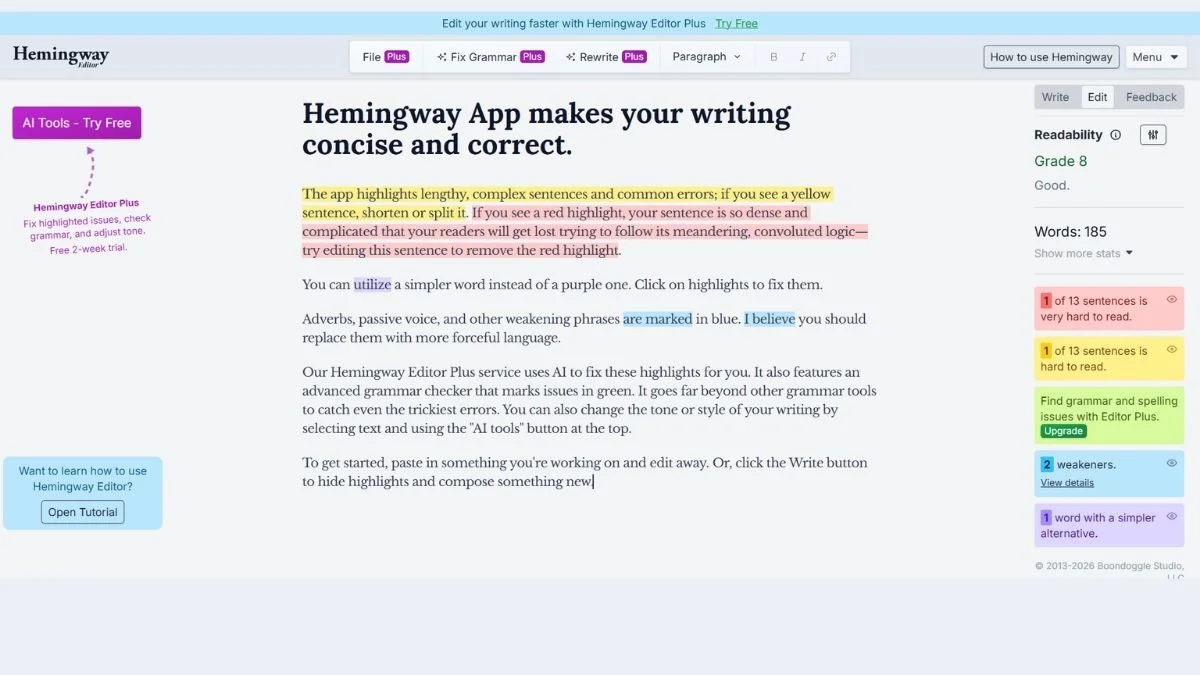
Hemingway Editor highlights:
- Hard-to-read sentences (yellow/red)
- Passive voice (green)
- Adverbs (blue)
- Weak phrases (purple)
It gives you a readability grade and pushes you toward shorter, punchier writing. Named after Ernest Hemingway's famously minimalist style.
The problem? It's rigid. It penalizes complexity even when complexity is appropriate. It has no grammar checker, no AI suggestions, and its desktop app costs a one-time $19.99 — while competitors offer far more for free.
Quick Comparison Table
| Tool | Best For | Free Plan? | AI Suggestions | Grammar Check | Readability Score |
|---|---|---|---|---|---|
| Grammarly | All-around writing | ✅ (limited) | ✅ Premium | ✅ | ✅ |
| ProWritingAid | Deep editing | ✅ (limited) | ✅ | ✅ | ✅ |
| QuillBot | Paraphrasing & rewrites | ✅ | ✅ | ✅ | ❌ |
| Wordtune | Sentence rewriting | ✅ | ✅ | ❌ | ❌ |
| LanguageTool | Multilingual grammar | ✅ | ❌ | ✅ | ❌ |
| Slick Write | Readability + style | ✅ | ❌ | ✅ | ✅ |
| Readable | Readability analytics | ❌ | ❌ | ❌ | ✅ |
| Writer.com | Teams & brand voice | ❌ | ✅ | ✅ | ✅ |
| Ginger Software | ESL writers | ✅ (limited) | ❌ | ✅ | ❌ |
1. Grammarly — Best All-Around Hemingway Alternative
If you could only pick one tool, Grammarly would be the safe bet for most people.
It goes far beyond what Hemingway does. The free version catches grammar, punctuation, and spelling errors. The premium version adds clarity suggestions, tone detection, plagiarism checking, and delivery insights.
Best use case: Bloggers, content marketers, professionals who write emails, reports, and long-form content.
Key advantage: Unlike Hemingway, Grammarly tells you why something is wrong and gives you a one-click fix.
Pros
- Real-time suggestions as you type
- Browser extension (works in Gmail, Google Docs, WordPress)
- Tone detector — knows if you sound aggressive or unclear
- Plagiarism checker (premium)
Cons
- Free plan is limited compared to premium ($12/month)
- Can be overly cautious with creative writing
- Doesn't deeply analyze sentence-level readability the way Hemingway does
Who should use it: Anyone who wants a full writing assistant, not just a style checker. Especially useful if you write across multiple platforms.
Pro Tip: Pair Grammarly with our guide on SEO-friendly writing to improve both readability and rankings at the same time.
2. ProWritingAid — Best for Deep Editing (#4 Is Best for Novels)
ProWritingAid is the most thorough editing tool on this list. It doesn't just flag problems — it explains them with reports on pacing, overused words, repeated phrases, sentence variation, and more.
Where Hemingway gives you a quick readability grade, ProWritingAid gives you a full editing session.
Best use case: Authors, fiction writers, academic writers, long-form content creators.
Key advantage: 25+ writing reports in one dashboard — readability, clichés, grammar, style, dialogue, and more.
Pros
- Extremely detailed feedback (goes deep where Hemingway is shallow)
- Works in MS Word, Google Docs, Scrivener
- One-time lifetime purchase available (~$399) vs. monthly subscriptions
- Better for long-form writing than almost anything else
Cons
- Overwhelming for beginners — information overload is real
- Interface isn't as clean or minimal as Hemingway
- Free version limits document length to 500 words
Who should use it: Writers who want editorial-level feedback without hiring a human editor.
3. QuillBot — Best for Rewriting and Paraphrasing
QuillBot takes a different approach. Instead of just flagging what's wrong, it rewrites your sentences for you. You can choose different modes: Standard, Fluency, Formal, Simple, Creative, or Expand.
Think of it as Hemingway with an AI brain that actually suggests fixes instead of just pointing at problems.
Best use case: Students, bloggers, ESL writers, anyone who needs to simplify or restructure sentences.
Key advantage: The Paraphrase tool can rewrite an entire paragraph while preserving the original meaning.
Pros
- Free plan is genuinely usable
- Multiple writing modes (formal, creative, fluency, etc.)
- Grammar checker included
- Great for simplifying complex academic or technical text
Cons
- Can sometimes alter meaning if not reviewed carefully
- Not ideal for original content creation
- No real readability score like Hemingway offers
Who should use it: ESL writers, students looking to simplify complex drafts, or anyone who's stuck on how to rephrase a sentence.
Want to use AI tools smartly for writing? See our guide to AI writing tools for a broader look.
Learn more at QuillBot's official site.
4. Wordtune — Best for Sentence-Level Rewriting
Wordtune is laser-focused on one thing: making your sentences better. You highlight a sentence, and it gives you 5–10 alternative versions. Shorter. More formal. More casual. More concise.
It's like having a smart editor sitting next to you, suggesting tweaks in real time.
Best use case: Content writers, marketers, anyone writing first drafts who needs help polishing sentences.
Key advantage: Rewrite suggestions are fast, accurate, and maintain your original intent better than most AI tools.
Pros
- Incredibly intuitive — paste and click
- Suggestions are usually high quality
- Works as a Chrome extension (Google Docs, Gmail)
- Free plan includes 10 rewrites/day
Cons
- Doesn't do grammar checking (pairs best with Grammarly)
- Limited free plan — 10 rewrites per day runs out fast
- No readability analytics
Who should use it: Writers who are happy with their ideas but struggle with how to phrase them.
5. LanguageTool — Best Free Hemingway Alternative for Multilingual Writers
LanguageTool is an open-source grammar and style checker that supports 20+ languages. Hemingway Editor is English-only. If you write in Spanish, German, French, or Portuguese, LanguageTool is probably the most useful alternative on this list.
Best use case: Non-English writers, multilingual teams, academic writers.
Key advantage: Deep grammar checking in over 20 languages — something no other tool on this list does.
Pros
- Truly free for basic use (browser extension is generous)
- Supports 20+ languages
- Privacy-focused: you can self-host it
- Integrates with LibreOffice, Google Docs, and browsers
Cons
- Style suggestions are less nuanced than Grammarly premium
- No AI rewriting features
- No readability score
Who should use it: ESL writers, international content teams, academics writing in multiple languages.
Check out LanguageTool here.
6. Slick Write — Best Free Hemingway-Like Readability Checker
Slick Write is the closest free alternative to Hemingway in terms of feel. It analyzes sentence length, passive voice, adverb use, and gives you a readability score. It's browser-based, requires no account, and it's completely free.
Best use case: Writers who want Hemingway-style feedback without paying.
Key advantage: Free, no sign-up, does nearly everything Hemingway does in the browser.
Pros
- 100% free with no word limits
- Detailed style stats: flow, structure, vocabulary
- Works instantly in the browser
- Shows sentence length distribution visually
Cons
- Interface feels dated
- No AI suggestions or rewrites
- Less polished than premium tools
- No integrations (copy-paste only)
Who should use it: Budget-conscious writers, students, casual bloggers who want quick readability feedback.
7. Readable — Best for Readability Analytics and Teams
Readable is a dedicated readability platform. It calculates multiple readability scores simultaneously — Flesch-Kincaid, Gunning Fog, SMOG, and more — and tracks your content's readability over time.
If you manage a content team and want to enforce consistent readability standards across all published content, Readable is built for that.
Best use case: Content managers, agencies, marketing teams with content style guides.
Key advantage: Multiple readability formulas in one dashboard — more scientific than Hemingway's single-score approach.
Pros
- Supports multiple readability formulas (not just one)
- URL scanning — analyze published pages directly
- API available for developers
- Team collaboration features
Cons
- No free plan (starts at ~$8/month)
- Not designed for individual writers
- No grammar checker or AI suggestions
Who should use it: Content managers, SEO teams, and agencies that need readability compliance across large content libraries.
For content teams, also check out our SEO checklist for beginners to ensure readability and optimization work together.
8. Writer.com — Best for Teams with Brand Voice Standards
Writer.com is an enterprise-grade writing assistant built for teams. It lets you define your brand voice, terminology, and style rules — then checks every piece of content against those standards.
Where Hemingway pushes everyone toward the same minimalist style, Writer.com enforces your style.
Best use case: Marketing teams, content departments, agencies managing multiple brands.
Key advantage: Custom style guides + AI writing + grammar checking all in one platform.
Pros
- Custom terminology and brand voice rules
- AI writing assistance built in
- Integrates with Google Docs, Figma, Chrome
- Plagiarism checker included
Cons
- Expensive — not practical for solo writers
- Overkill for personal or casual writing
- Requires setup time to configure brand voice
Who should use it: Content leads, marketing directors, and agencies who need every writer to stay on-brand.
9. Ginger Software — Best for ESL and Non-Native English Writers
Ginger Software has been around since 2010 and is still one of the best tools for non-native English speakers. It offers grammar correction, sentence rephrasing, and a translation feature in a single package.
Best use case: ESL students, international professionals, non-native English writers.
Key advantage: Built-in translation + grammar correction combo that's hard to find elsewhere at this price.
Pros
- Grammar correction tuned for common ESL mistakes
- Sentence rephrasing feature
- Built-in dictionary and translator
- Mobile app available
Cons
- UI feels a bit outdated in 2026
- Premium plan required for full features
- Less accurate than Grammarly for native-level writing nuances
Who should use it: Non-native English writers who need grammar correction and translation support in one tool.
Expert Tips: Getting the Most Out of Any Hemingway Alternative
Here are a few practical tips that apply no matter which tool you choose:
1. Don't accept every suggestion blindly. Every tool makes mistakes. Read the suggestion, understand why it's flagged, then decide if the change actually improves your writing.
2. Use readability tools as a gut check, not a rulebook. A grade 8 readability level isn't always the goal. A legal brief should read differently than a blog post. Match the tool's suggestions to your audience.
3. Pair a style checker with a grammar checker. Hemingway doesn't check grammar. Neither does Slick Write. Use them alongside a grammar tool (Grammarly or LanguageTool) for complete coverage.
4. Run your first draft through the tool — not your outline. These tools work best when you have actual prose to analyze. Don't let readability anxiety slow down your drafting process.
5. Check your SEO score alongside readability. Readable content that no one finds is wasted effort. Use tools like our free website SEO score checker alongside your writing tool to cover both bases.
Which Hemingway Alternative Should You Choose?
Here's the honest breakdown:
- Just want free and simple? → Use Slick Write
- Need full grammar + style feedback? → Use Grammarly
- Writing a book or long-form content? → Use ProWritingAid
- Need to rephrase sentences quickly? → Use QuillBot or Wordtune
- Writing in another language? → Use LanguageTool
- Managing a content team? → Use Writer.com or Readable
- ESL or non-native English? → Use Ginger Software
There's no single "best" tool. The right choice depends on what you write, who you write for, and how deeply you want to edit.
Related Guides You Might Find Useful
Since you're thinking about improving your writing workflow, here are some resources that might help you take the next step:
- Best Free Grammar Checkers in 2026
- QuillBot Review & Complete Guide
- Grammarly Review & Beginner's Guide
- QuillBot Alternatives
- Grammarly Alternatives
- How to Improve Content Readability for SEO
- How to Write SEO-Friendly Meta Descriptions
- On-Page SEO Checklist: The Complete Guide
- How to Optimize Blog Posts for SEO
- Essential Content Optimization Practices
- Best AI Tools for Content Creators
- Free AI Writing Tools — No Word Limit
- Free AI Content Generators for Bloggers
- Jasper AI vs Copy.ai vs Writesonic
- QuillBot vs Wordtune vs Grammarly
- Grammarly vs ProWritingAid vs Hemingway
- Free vs Paid AI Writing Tools
- Best Free AI Tools to Use Daily
- How to Use Keywords for SEO Effectively
- How Content Marketing Boosts SEO
- ChatGPT vs Claude vs Gemini — Which AI Wins?
- Best Free ChatGPT Alternatives
- Top Best Wordtune Alternatives
- Best Jenni AI Alternatives for Academic Writing
- Best HIX AI Alternatives
- Best Copy AI Alternatives
- Best Jasper AI Alternatives for Marketing Copy
- Top Best Writesonic Alternatives
- Free AI Copywriting Tools for Marketing
- Free AI Essay Writers — No Plagiarism
Frequently Asked Questions
Is there a completely free alternative to Hemingway Editor?
Yes — Slick Write and LanguageTool both offer free, unlimited use without requiring an account. Slick Write is the closest match to Hemingway's readability features. LanguageTool adds grammar checking and multilingual support on top of that. For most casual writers, these two tools combined offer everything Hemingway does for free.
Is Grammarly better than Hemingway Editor?
For most writers, yes — Grammarly does more. Hemingway focuses purely on readability and style clarity. Grammarly adds grammar correction, spelling, tone detection, and (with premium) AI suggestions. The only case where Hemingway wins is if you specifically want minimalist, distraction-free readability feedback with no additional noise.
What is the best Hemingway alternative for students?
QuillBot is the most student-friendly alternative, especially for paraphrasing and simplifying complex text. ProWritingAid is excellent for longer essays and research papers. LanguageTool is a strong free option that works well in Google Docs — where most students write.
Can I use these tools with Google Docs?
Yes — most of these tools work with Google Docs. Grammarly, LanguageTool, Wordtune, and QuillBot all offer browser extensions that work directly inside Google Docs. Writer.com also has a Google Docs integration. Hemingway Editor, by contrast, requires you to copy-paste your text into its separate interface.
Which tool is best for non-native English writers?
Ginger Software and LanguageTool are the best choices for ESL writers. Ginger is specifically tuned to fix common ESL errors and includes a built-in translator. LanguageTool supports 20+ languages and works well for writers who switch between English and their native language. QuillBot's paraphrase modes also help non-native writers find more natural-sounding alternatives.
Does ProWritingAid replace Hemingway Editor completely?
For most use cases, yes. ProWritingAid includes a readability report (similar to Hemingway), plus 24 other reports on grammar, style, pacing, clichés, and more. The main trade-off is complexity — ProWritingAid is more powerful but less minimal. If you like Hemingway's simplicity, ProWritingAid will feel like a lot more to process.
Conclusion
Hemingway Editor is a useful starting point — but it's not the finish line.
The best Hemingway alternatives give you more: grammar checking, AI rewrites, multilingual support, team features, and integrations that fit into your actual workflow.
Here's a quick recap:
- Free and simple: Slick Write or LanguageTool
- Best overall: Grammarly
- Deepest editing: ProWritingAid
- Fastest rewrites: QuillBot or Wordtune
- Teams and brand voice: Writer.com
Pick the tool that matches your writing context — not the one with the most features. A blogger doesn't need Writer.com. A marketing team doesn't need Slick Write.
Start with the free versions of Grammarly and QuillBot. You'll likely find everything you need without spending a cent.
And if you want your writing to actually rank on Google — not just read well — check out our free SEO score checker and keyword research tool to see where your content stands.
Good writing and good SEO aren't opposites. The best content is clear, helpful, and findable. Now go write something worth reading.