9 Best Linguix Alternatives That Actually Improve Your Writing (2026)

Let's be honest — Linguix is decent, but it's not for everyone.
Maybe the free plan feels too limited. Maybe the suggestions miss the mark for your writing style. Or maybe you're just curious whether there's something better out there.
Good news: there is. Several tools crush Linguix in specific areas — whether you're a student writing essays, a marketer crafting copy, or a professional polishing emails.
In this guide, you'll find 9 hand-picked Linguix alternatives with honest pros and cons, real use cases, and a clear answer to: which one is right for you?
Quick heads-up: Tool #4 is an absolute game-changer for academic writers, and most people have never heard of it.
What Is Linguix — And Why Are People Looking for Alternatives?
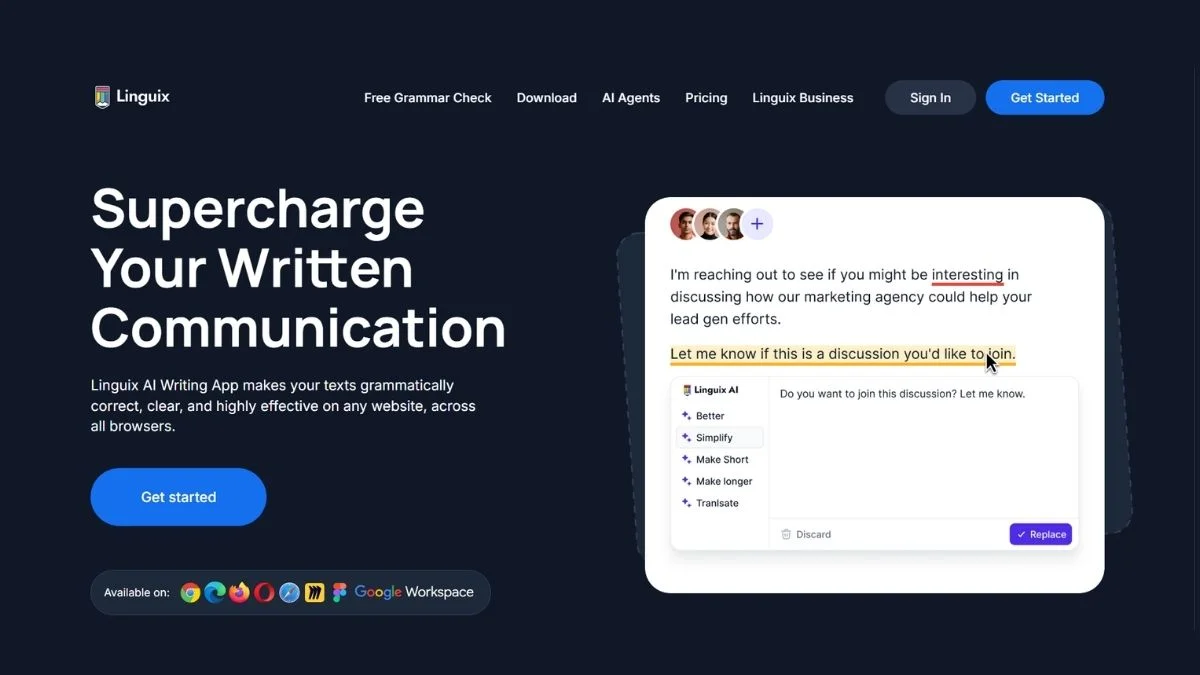
Linguix is an AI writing assistant that offers grammar checking, style suggestions, paraphrasing, and writing templates. It's available as a browser extension and web app.
So why are people leaving?
- The free plan limits advanced suggestions
- Its AI suggestions can feel generic or off-tone
- The interface isn't as clean as newer competitors
- Some users find it too "sales-y" in its upsell approach
If any of those sound familiar, keep reading. The tools below solve exactly these problems.
At a Glance: Linguix Alternatives Comparison Table
| Tool | Best For | Free Plan | AI-Powered | Price Starts At |
|---|---|---|---|---|
| Grammarly | All-around writing | ✅ Yes | ✅ Yes | $12/month |
| QuillBot | Paraphrasing & rewriting | ✅ Yes | ✅ Yes | $9.95/month |
| ProWritingAid | Deep editing & analysis | ✅ Limited | ✅ Yes | $10/month |
| Hemingway Editor | Clarity & readability | ✅ Yes | ❌ No | $19.99 one-time |
| Wordtune | Smart sentence rewrites | ✅ Yes | ✅ Yes | $9.99/month |
| LanguageTool | Multilingual grammar | ✅ Yes | ✅ Yes | $5.99/month |
| Ginger Software | ESL & non-native speakers | ✅ Yes | ✅ Yes | $13.99/month |
| Sapling | Business & team writing | ✅ Limited | ✅ Yes | $25/month |
| Writer.com | Brand-consistent writing | ❌ Trial | ✅ Yes | $18/month |
9 Best Linguix Alternatives Ranked
1. Grammarly — The Gold Standard of Writing Assistants
What it is: Grammarly is the most widely used AI writing tool in the world, with over 30 million daily active users. It catches grammar, spelling, tone, clarity, and plagiarism issues across virtually every platform.
Best use case: Anyone who writes regularly — emails, blog posts, reports, social media, or academic papers.
If you haven't tried it yet, you're missing out. Grammarly's browser extension works seamlessly everywhere from Gmail to Google Docs to LinkedIn.
Pros:
- Exceptional real-time grammar and style suggestions
- Tone detection helps match your writing to your audience
- Works in 500,000+ apps via browser extension
- Plagiarism checker included in premium
Cons:
- Premium plan is pricier than most competitors
- Occasionally over-corrects creative or casual writing
- No offline mode
Who should use it: Writers, bloggers, professionals, and students who want a reliable all-in-one assistant.
Key advantage over Linguix: Grammarly's suggestions are more context-aware, and its tone detector is miles ahead.
📘 Learn more: Check out our in-depth Grammarly Review & Beginners Guide and explore the Best Free Grammar Checkers for a full comparison.
2. QuillBot — The King of Paraphrasing
What it is: QuillBot is an AI-powered paraphrasing and summarization tool with a built-in grammar checker. It lets you rewrite sentences in multiple modes — Standard, Fluency, Formal, Creative, and more.
Best use case: Students, content writers, and ESL learners who need to rephrase content without losing meaning.
Ever stared at a sentence and just knew it was wrong but couldn't fix it? QuillBot fixes it instantly — and gives you multiple options.
Pros:
- 8 rewriting modes including Academic and Creative
- Excellent summarizer for long documents
- Co-Writer feature combines writing and research
- Generous free plan (250 words per paraphrase)
Cons:
- Premium needed to unlock all modes and longer inputs
- Grammar checker isn't as strong as Grammarly's
- Can occasionally lose nuance in complex rewrites
Who should use it: Students, bloggers, and non-native English speakers who want fast, flexible rewriting.
Key advantage over Linguix: QuillBot's paraphrasing engine is significantly more powerful and versatile.
📘 Also read: QuillBot Review & Complete Guide and see how it stacks up in our QuillBot vs Wordtune vs Grammarly comparison.
3. ProWritingAid — For Writers Who Want Deep Feedback
What it is: ProWritingAid is a professional-grade writing tool that goes far beyond grammar. It analyzes your writing style, sentence structure, overused words, pacing, and even dialogue — making it a favorite among novelists and long-form writers.
Best use case: Fiction writers, authors, journalists, and content professionals who want detailed manuscript-level feedback.
Think of ProWritingAid as having a professional editor sitting next to you — except it never gets tired or charges by the hour.
Pros:
- 25+ writing reports (Style, Pacing, Dialogue, Clichés, etc.)
- Integrates with Scrivener, Word, and Google Docs
- One-time lifetime purchase option available
- In-depth explanations for every suggestion
Cons:
- Interface has a learning curve for new users
- Can feel overwhelming with too many suggestions at once
- Free version is limited to 500 words
Who should use it: Serious writers, novelists, and content professionals who want editorial-depth analysis.
Key advantage over Linguix: ProWritingAid goes 10x deeper with stylistic feedback that Linguix simply doesn't offer.
4. Hemingway Editor — Simplicity That Transforms Your Writing
What it is: Hemingway Editor is a no-frills readability tool that highlights hard-to-read sentences, passive voice, adverb overuse, and complex words. It gives your writing a readability grade level.
Best use case: Writers who want brutally honest feedback on clarity — especially bloggers, journalists, and content marketers.
🎯 This is the one most people overlook — and it's the best tool for academic clarity.
If your writing tends to run long and complicated, Hemingway cuts it down to size. The desktop app works completely offline, which is a huge bonus.
Pros:
- Clean, distraction-free interface
- Readability score helps target specific audiences
- Desktop app works offline (one-time purchase)
- Free web version available
Cons:
- No real-time cloud sync
- Doesn't check grammar in detail
- Not ideal for technical or formal writing
Who should use it: Bloggers, content marketers, and students who want to write clearly and concisely.
Key advantage over Linguix: Zero upsell pressure, offline capability, and a laser-focus on readability that Linguix ignores.
5. Wordtune — AI-Powered Sentence Rewrites Done Right
What it is: Wordtune is an AI writing companion developed by AI21 Labs. Unlike standard grammar checkers, it focuses on rewriting — helping you say what you mean more clearly, concisely, or creatively.
Best use case: Professionals writing emails, business reports, or anyone who wants to sound more polished without losing their voice.
Ever written something that was technically correct but just felt off? Wordtune fixes that.
Pros:
- Smart rewrite suggestions preserve your original intent
- Shorten and expand sentence options
- Real-time suggestions as you type
- Chrome extension works in Gmail, Docs, and more
Cons:
- Free plan limited to 10 rewrites per day
- No plagiarism checker
- Works best in English only
Who should use it: Business professionals, marketers, and non-native English speakers who want their writing to sound natural.
Key advantage over Linguix: Wordtune's rewrite quality feels more natural and less robotic than Linguix's suggestions.
📘 See also: Top Best Wordtune Alternatives for Sentence Rewriting if you want to explore beyond Wordtune too.
6. LanguageTool — The Best Free Multilingual Grammar Checker
What it is: LanguageTool is an open-source grammar and style checker that supports 30+ languages including German, French, Spanish, Portuguese, Polish, and more. It's a powerhouse for multilingual writers and non-English content.
Best use case: Non-English writers, multilingual teams, and users who need grammar checking in languages Grammarly doesn't support well.
Are you writing content for a non-English audience? This is hands down the best free tool for that job.
Pros:
- Supports 30+ languages with strong accuracy
- Browser extension and desktop app available
- Self-hosted option for privacy-conscious users
- Generous free plan
Cons:
- AI writing suggestions limited vs. Grammarly
- Interface feels dated compared to newer tools
- Style suggestions less sophisticated in some languages
Who should use it: Multilingual content creators, international businesses, and anyone writing in languages beyond English.
Key advantage over Linguix: LanguageTool's multilingual support is simply unmatched — Linguix is English-first.
📘 Explore more: Free AI Grammar Checkers All Languages for additional options.
7. Ginger Software — Perfect for ESL Writers
What it is: Ginger Software is a grammar and spell checker with a strong focus on helping non-native English speakers write correctly. It includes a translation feature, sentence rephraser, and a personal trainer mode.
Best use case: ESL learners, students, and international professionals who write in English but aren't native speakers.
Pros:
- Translation to/from 40+ languages
- Personal trainer helps you learn from mistakes
- Mobile app available
- Rephrasing suggestions for awkward sentences
Cons:
- Free version has significant limitations
- Chrome extension can slow down browser
- Less accurate than Grammarly for advanced grammar
Who should use it: Non-native English speakers who want a grammar tool that also helps them improve over time.
Key advantage over Linguix: Ginger's personal trainer mode turns corrections into learning opportunities — Linguix doesn't do this.
8. Sapling — Built for Customer-Facing Teams
What it is: Sapling is an AI writing assistant designed for teams — specifically customer support, sales, and business communication. It learns your company's preferred language and tone over time.
Best use case: Customer support teams, sales reps, and business users who need consistent, professional communication at scale.
Pros:
- Team-wide consistency in messaging
- Smart autocomplete speeds up repetitive responses
- Integrates with Salesforce, Zendesk, HubSpot, and more
- Learns your team's language style over time
Cons:
- Not ideal for individual or creative writing
- Pricing targets businesses, not individuals
- Limited free plan
Who should use it: Customer service managers, sales teams, and businesses that want consistent brand voice in all communications.
Key advantage over Linguix: Sapling is purpose-built for business writing at scale — something Linguix was never designed for.
9. Writer.com — For Brand-Consistent Enterprise Writing
What it is: Writer.com is an enterprise-grade AI writing tool that enforces brand guidelines, style guides, and terminology across entire teams. Used by companies like Intuit, Spotify, and L'Oréal.
Best use case: Marketing teams, agencies, and enterprises that need every piece of content to align with brand voice.
Pros:
- Custom style guide enforcement
- Terminology management (flagging off-brand words)
- Team collaboration features
- High-quality AI content generation
Cons:
- No meaningful free plan
- Overkill for individual writers
- Pricing is enterprise-level
Who should use it: Marketing directors, brand managers, and enterprise content teams.
Key advantage over Linguix: Writer.com operates at a fundamentally different level — it's a system for brand consistency, not just grammar.
🏆 Pro Tips: Getting the Most From Any Writing Tool
Here are some things most users never do — but should:
- Use multiple tools together. Grammarly for grammar + Hemingway for readability = exceptional writing.
- Don't accept every suggestion. AI tools sometimes change your voice. Review, don't blindly accept.
- Use the tone detector. If your tool has tone analysis, use it before sending important emails.
- Turn off spell-check in-tool while using these. Overlapping corrections create confusion.
- Run your content through a free AI checker. Tools like ZeroGPT can check if your writing sounds too robotic.
Also check: Best Free AI Writing Tools No Word Limit for tools with no character caps.
Which Linguix Alternative Should You Choose?
Here's a straight answer based on your situation:
You're a student → Go with QuillBot (paraphrasing) + LanguageTool (grammar). Both have solid free plans.
You're a blogger or content writer → Grammarly + Hemingway Editor is the classic power combo.
You write fiction or long-form content → ProWritingAid is your best friend.
You write in another language → LanguageTool — nothing else comes close.
You're running a customer support team → Sapling was made for you.
You run a marketing team → Writer.com if you have the budget.
You just want clear, confident writing → Wordtune is simple and effective.
Further Reading Worth Bookmarking
- Grammarly Alternatives — If you're also tired of Grammarly
- QuillBot Alternatives — More paraphrasing tools worth trying
- Best AI Writing Tools Complete Guide — Full breakdown of top AI tools
- Jasper AI vs Copy AI vs Writesonic — For marketing copy
- Free AI Tools for Freelancers — If you freelance
- Best AI Tools for Students — Student-focused toolkit
- Free AI Content Generators for Bloggers — For blog writing
- Free AI Essay Writers No Plagiarism — Academic writing
- Best Free AI Tools to Use Daily — Daily productivity picks
- Top 10 AI Tools You Must Try — If you want to explore further
- ChatGPT vs Claude vs Gemini — For those considering AI chatbots
- Best Jasper AI Alternatives for Marketing Copy
- Top Best Writesonic Alternatives for SEO Blog Writing
- Best HIX AI Alternatives for All-in-One AI Writing
- Best Jenni AI Alternatives for Academic Writing
- Top Smodin Alternatives for AI Essay Writing
- Best Copy AI Alternatives for Generating Sales Copy
- Top Best Sudowrite Alternatives for Fiction Writing
- Free vs Paid AI Writing Tools — Is Upgrading Worth It?
- Free AI Productivity Tools for Teams
- Free AI Copywriting Tools for Marketing
- Best Free AI for Realistic Photos
- Does AI Generated Content Hurt Your SEO?
- ACEEssay Review — AI Detectors & Best AI Writing Tools
- Free AI Article Writers Full Length
- Best Free Grammar Checkers
- Free AI Homework Helpers All Subjects
- Best Free AI Chrome Extensions
- ZeroGPT vs Other AI Detectors
- Top 100 Best AI Tools
- 25 Best AI Tools for Every Profession
- Essential Content Optimization Practices Every Marketer Should Know
- Free AI Tools for Entrepreneurs
🔍 External Resources Worth Checking
- Grammarly Official Site — Most popular AI writing assistant
- QuillBot Official Site — Best paraphrasing tool
- LanguageTool Official Site — Best open-source multilingual checker
- ProWritingAid Official Site — Best for authors and long-form writers
- Google's Writing Guide — Google's own developer style guide, great for technical writers
❓ Frequently Asked Questions About Linguix Alternatives
Q1: What is the best free alternative to Linguix?
Grammarly's free plan is the best all-around free Linguix alternative. It covers grammar, spelling, tone, and clarity with no character limits. For paraphrasing specifically, QuillBot's free plan (250 words per session) is excellent. For multilingual writing, LanguageTool is unbeatable and completely free for basic use.
Both Grammarly and QuillBot have browser extensions that work in Gmail, Google Docs, and most writing platforms — making them drop-in replacements for Linguix with zero setup required.
Q2: Is Grammarly better than Linguix?
Yes, for most users, Grammarly is the stronger tool. Grammarly has a larger training dataset, better tone detection, more integrations, and a more polished interface. Linguix has some unique template features, but in raw grammar and style correction quality, Grammarly consistently outperforms it.
That said, Grammarly's premium plan costs more, so if budget is your main concern, consider LanguageTool or the free versions of these tools first.
Q3: Which Linguix alternative is best for students?
QuillBot is the top pick for students, especially for paraphrasing research sources and avoiding accidental plagiarism. Pair it with Grammarly's free grammar checker and you have a powerful, cost-free student writing toolkit.
For academic long-form writing, also consider ProWritingAid which offers a free plan and deep analysis of academic-style writing issues like passive voice and vague language.
Q4: Can I use these tools to avoid AI detection?
Not reliably, and that approach carries risk. While tools like QuillBot can help humanize AI-generated text, modern AI detectors are becoming increasingly accurate. The better strategy is to use these tools to improve your own writing — not to mask AI content.
Check out our guide on Does AI Generated Content Hurt Your SEO for what Google actually says about this. Also see ZeroGPT Review to understand how detection tools work.
Q5: What is the best Linguix alternative for non-English writers?
LanguageTool is the clear winner for non-English writing. It supports 30+ languages with genuine grammatical understanding — not just spell-checking. German, Spanish, French, Portuguese, and Polish users especially benefit from its depth.
Ginger Software is a close second, particularly for ESL learners who write primarily in English and want help correcting their mistakes while learning from them.
Q6: Are any of these tools completely free?
Yes — several tools offer genuinely useful free plans. LanguageTool, Grammarly (basic), QuillBot (250-word limit), and Hemingway Editor (web version) are all free with meaningful functionality.
For a full breakdown, visit our Best Free AI Writing Tools No Word Limit guide and Ultimate List of Best AI Tools for Beginners.
Conclusion: The Right Tool Makes Your Writing Unstoppable
Linguix isn't bad — it just isn't the best option anymore.
The tools above cover every type of writer: students, bloggers, business professionals, multilingual writers, and enterprise teams. Most offer free plans that are already better than what Linguix gives you at no cost.
Here's the short version:
- Grammarly → Best all-around choice
- QuillBot → Best for paraphrasing and rewriting
- ProWritingAid → Best for long-form and fiction writing
- Hemingway Editor → Best for clarity and readability
- LanguageTool → Best for non-English writing
Pick one, try it for a week, and see how it transforms your writing. Most offer free trials — there's no reason not to start today.
Want to go deeper? Explore our AI Summarizer Review, Best Free ChatGPT Alternatives, and Free AI Assistants Better Than ChatGPT to build your complete AI writing stack.